<p><span style="font-weight: 400;">Have you ever taken a picture only to have it come out not quite right? Modern day cameras are amazing, but they’re not quite as good at capturing imagery as the human eye. </span><a href="https://eyeq.photos/perfectlyclear"><span style="font-weight: 400;">Perfectly Clear</span></a><span style="font-weight: 400;"> is the solution— this software uses automatic batch corrections that mimic the human eye. With just one click, your photo will be back to looking perfect.</span></p>
<p><span style="font-weight: 400;">You can even try it for yourself! </span><a href="https://eyeq.photos/try/perfectly-clear-complete-v3"><b>Try Perfectly Clear for free for 21 days</b></a><b>.</b></p>
<h2><span style="font-weight: 400;">6 Reasons Why You Need Perfectly Clear for Your Photo Editing</span></h2>
<h3><span style="font-weight: 400;">1. Saves You Time</span></h3>
<p><span style="font-weight: 400;">For some photographers, sitting at a desk editing photos for hours is part of the fun of photography. For others, it’s a nightmare. Why waste time editing your photos when you don’t have to? Perfectly Clear adds up to 40 automatic corrections to each photo in seconds. Plus, the batch processing option lets you edit multiple photos in no time. Edit your entire photo shoot in minutes!</span></p>
<p>Before:<img loading="lazy" decoding="async" class="wp-image-4586 aligncenter" src="https://www.artsycouture.com/blog/wp-content/uploads/2019/11/dock-4.png" alt="" width="600" height="360" srcset="https://www.artsycouture.com/blog/wp-content/uploads/2019/11/dock-4.png 958w, https://www.artsycouture.com/blog/wp-content/uploads/2019/11/dock-4-300x180.png 300w, https://www.artsycouture.com/blog/wp-content/uploads/2019/11/dock-4-768x461.png 768w, https://www.artsycouture.com/blog/wp-content/uploads/2019/11/dock-4-500x300.png 500w" sizes="(max-width: 600px) 100vw, 600px" /></p>
<p>After:<img loading="lazy" decoding="async" class="wp-image-4587 aligncenter" src="https://www.artsycouture.com/blog/wp-content/uploads/2019/11/dock-4_PerfectlyClear.jpg" alt="" width="600" height="360" srcset="https://www.artsycouture.com/blog/wp-content/uploads/2019/11/dock-4_PerfectlyClear.jpg 958w, https://www.artsycouture.com/blog/wp-content/uploads/2019/11/dock-4_PerfectlyClear-300x180.jpg 300w, https://www.artsycouture.com/blog/wp-content/uploads/2019/11/dock-4_PerfectlyClear-768x461.jpg 768w, https://www.artsycouture.com/blog/wp-content/uploads/2019/11/dock-4_PerfectlyClear-500x300.jpg 500w" sizes="(max-width: 600px) 100vw, 600px" /></p>
<h3><span style="font-weight: 400;">2. Smart Corrections</span></h3>
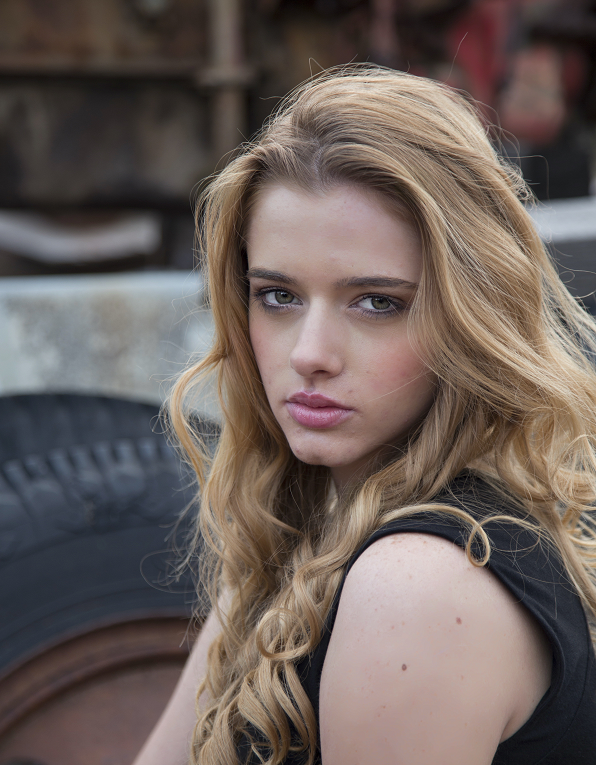
<p><span style="font-weight: 400;">Perfectly Clear has been perfecting their automatic corrections for more than 15 years. As leaders in photo editing innovation, you can trust that their software will automatically add the necessary corrections. Let Perfectly Clear do the automatic corrections, then use their Finishing Tools and Presets to add a different look and feel to your photo. If you create a preset that you like, you can always save it for future use! </span></p>
<p>Before:</p>
<p><img loading="lazy" decoding="async" class="wp-image-4588 aligncenter" src="https://www.artsycouture.com/blog/wp-content/uploads/2019/11/leigh.png" alt="" width="599" height="766" srcset="https://www.artsycouture.com/blog/wp-content/uploads/2019/11/leigh.png 596w, https://www.artsycouture.com/blog/wp-content/uploads/2019/11/leigh-234x300.png 234w" sizes="(max-width: 599px) 100vw, 599px" /></p>
<p>After:<img loading="lazy" decoding="async" class="wp-image-4589 aligncenter" src="https://www.artsycouture.com/blog/wp-content/uploads/2019/11/leigh-2.png" alt="" width="600" height="770" srcset="https://www.artsycouture.com/blog/wp-content/uploads/2019/11/leigh-2.png 596w, https://www.artsycouture.com/blog/wp-content/uploads/2019/11/leigh-2-234x300.png 234w" sizes="(max-width: 600px) 100vw, 600px" /></p>
<h3><span style="font-weight: 400;">3. Fits Seamlessly Into Your Workflow</span></h3>
<p><span style="font-weight: 400;">Do you usually use Photoshop to edit your images? That’s perfect, because Perfectly Clear works as a plug-in for Photoshop, Lightroom (pre-subscription based version), Photoshop Elements, and PaintShop Pro! If you don’t use any of these in your workflow, you can use the standalone version of Perfectly Clear. There’s a solution for everyone!</span></p>
<h3></h3>
<h3><span style="font-weight: 400;">4. It’s Easy to Use</span></h3>
<p><span style="font-weight: 400;">Some photo editing platforms take years to master, but Perfectly Clear is easy to learn and use. There’s no learning curve, no lengthy courses to take, and no confusing manuals to read. They practically do all the work for you! </span></p>
<p>Before:</p>
<p><img loading="lazy" decoding="async" class="wp-image-4590 aligncenter" src="https://www.artsycouture.com/blog/wp-content/uploads/2019/11/valley.png" alt="" width="600" height="360" srcset="https://www.artsycouture.com/blog/wp-content/uploads/2019/11/valley.png 958w, https://www.artsycouture.com/blog/wp-content/uploads/2019/11/valley-300x180.png 300w, https://www.artsycouture.com/blog/wp-content/uploads/2019/11/valley-768x461.png 768w, https://www.artsycouture.com/blog/wp-content/uploads/2019/11/valley-500x300.png 500w" sizes="(max-width: 600px) 100vw, 600px" />After:</p>
<p><img loading="lazy" decoding="async" class="wp-image-4591 aligncenter" src="https://www.artsycouture.com/blog/wp-content/uploads/2019/11/valley_PerfectlyClear.jpg" alt="" width="600" height="360" srcset="https://www.artsycouture.com/blog/wp-content/uploads/2019/11/valley_PerfectlyClear.jpg 958w, https://www.artsycouture.com/blog/wp-content/uploads/2019/11/valley_PerfectlyClear-300x180.jpg 300w, https://www.artsycouture.com/blog/wp-content/uploads/2019/11/valley_PerfectlyClear-768x461.jpg 768w, https://www.artsycouture.com/blog/wp-content/uploads/2019/11/valley_PerfectlyClear-500x300.jpg 500w" sizes="(max-width: 600px) 100vw, 600px" /></p>
<h3><span style="font-weight: 400;">5. Once You Own It, You Own It</span></h3>
<p><span style="font-weight: 400;">Once you purchase Perfectly Clear, you own it. You don’t have to pay monthly unlike many other photo editing software companies. No subscriptions here!</span></p>
<p>&nbsp;</p>
<h3><span style="font-weight: 400;">6. Did We Mention the Automatic Retouching?</span></h3>
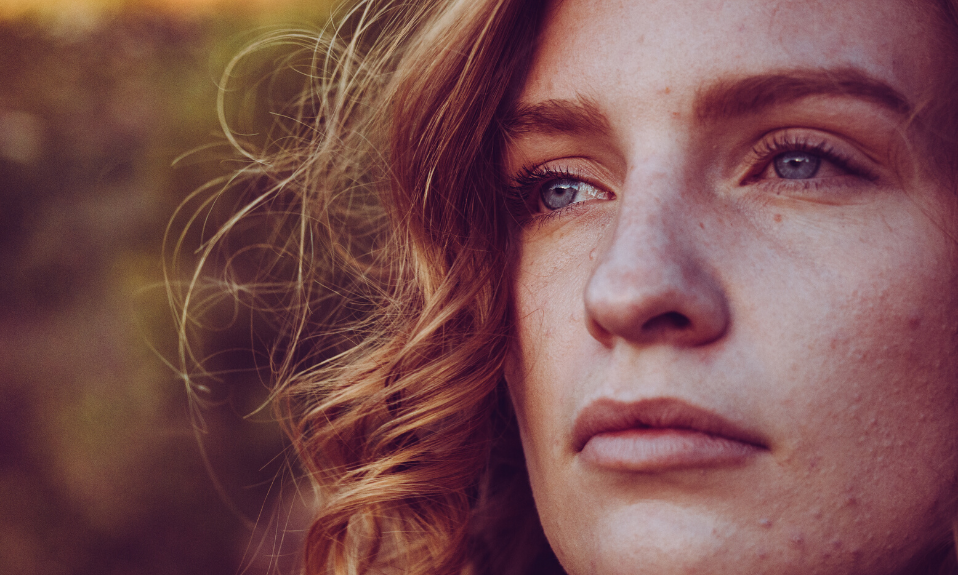
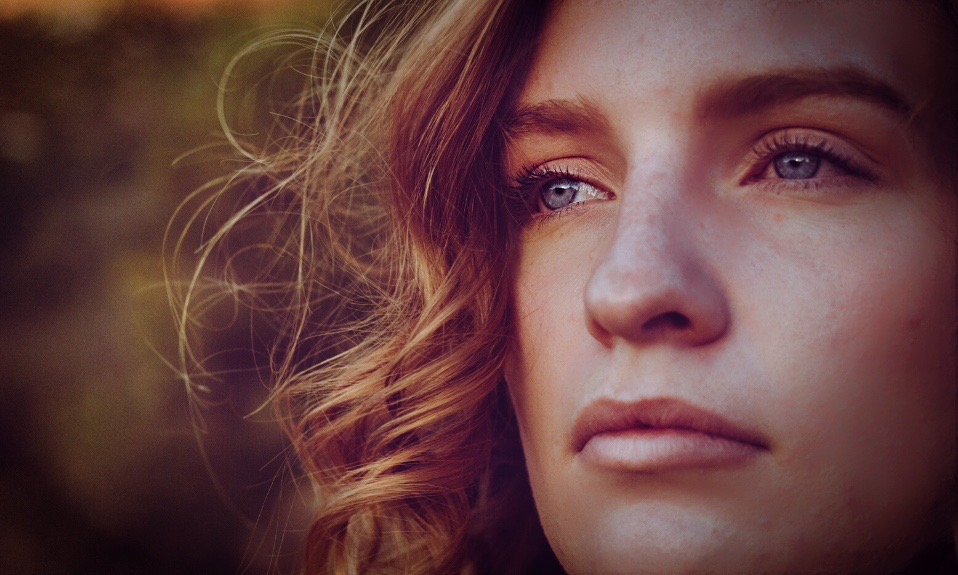
<p><span style="font-weight: 400;">If you’re a portrait photographer, the automatic retouching will change your life. Perfectly Clear automatically detects faces. From there, you can use the set of Perfect Portraiture presets to choose the level of retouching you would like. There’s everything from Natural to Supermodel.</span></p>
<p>Before:</p>
<p><img loading="lazy" decoding="async" class="aligncenter wp-image-4592" src="https://www.artsycouture.com/blog/wp-content/uploads/2019/11/woman-before.png" alt="" width="600" height="360" srcset="https://www.artsycouture.com/blog/wp-content/uploads/2019/11/woman-before.png 958w, https://www.artsycouture.com/blog/wp-content/uploads/2019/11/woman-before-300x180.png 300w, https://www.artsycouture.com/blog/wp-content/uploads/2019/11/woman-before-768x461.png 768w, https://www.artsycouture.com/blog/wp-content/uploads/2019/11/woman-before-500x300.png 500w" sizes="(max-width: 600px) 100vw, 600px" />After:</p>
<p><img loading="lazy" decoding="async" class="aligncenter wp-image-4593" src="https://www.artsycouture.com/blog/wp-content/uploads/2019/11/woman-after-retouching.jpg" alt="" width="600" height="360" srcset="https://www.artsycouture.com/blog/wp-content/uploads/2019/11/woman-after-retouching.jpg 958w, https://www.artsycouture.com/blog/wp-content/uploads/2019/11/woman-after-retouching-300x180.jpg 300w, https://www.artsycouture.com/blog/wp-content/uploads/2019/11/woman-after-retouching-768x461.jpg 768w, https://www.artsycouture.com/blog/wp-content/uploads/2019/11/woman-after-retouching-500x300.jpg 500w" sizes="(max-width: 600px) 100vw, 600px" /></p>
<p>&nbsp;</p>
<hr />
<h2><span style="font-weight: 400;">Try Perfectly Clear Today</span></h2>
<p><span style="font-weight: 400;">Perfectly Clear will change the way you edit your photos for the better. If you don’t believe us, try it for free! </span><a href="https://eyeq.photos/try/perfectly-clear-complete-v3"><b>Use the 21-day free trial,</b></a> <span style="font-weight: 400;">no strings attached. </span></p>
<hr />
<p>Get more from our blog:</p>
<ul>
<li><a href="https://www.artsycouture.com/blog/everything-you-need-for-the-perfect-holiday-cards/">Everything You Need for the Perfect Holiday Cards</a></li>
<li><a href="https://www.artsycouture.com/blog/maximize-your-mini-sessions/">Maximize Your Mini Sessions</a></li>
<li><a href="https://www.artsycouture.com/blog/Pro-Photographers-Guide-Lightroom-Editing">Pro Photographer&#8217;s Guide to Lightroom Editing</a></li>
</ul>
<p><a href="https://www.artsycouture.com/Account/LogOn?logoff=True" target="_blank" rel="noopener noreferrer"><img loading="lazy" decoding="async" class="aligncenter wp-image-4289 size-full" src="https://s3.amazonaws.com/artsy-cdn/static/assets/img/wordpress-artifacts/2019/06/27115616/CTA-Artsy-Gotham-b_.jpg" alt="CTA-Artsy" width="745" height="133" srcset="https://s3.amazonaws.com/artsy-cdn/static/assets/img/wordpress-artifacts/2019/06/27115616/CTA-Artsy-Gotham-b_.jpg 745w, https://s3.amazonaws.com/artsy-cdn/static/assets/img/wordpress-artifacts/2019/06/27115616/CTA-Artsy-Gotham-b_-300x54.jpg 300w" sizes="(max-width: 745px) 100vw, 745px" /></a></p>
{"id":4585,"date":"2019-11-22T12:45:11","date_gmt":"2019-11-22T17:45:11","guid":{"rendered":"https:\/\/www.artsycouture.com\/blog\/?p=4585"},"modified":"2019-11-21T12:59:04","modified_gmt":"2019-11-21T17:59:04","slug":"everything-you-need-to-know-about-perfectly-clear","status":"publish","type":"post","link":"https:\/\/www.artsycouture.com\/blog\/everything-you-need-to-know-about-perfectly-clear\/","title":{"rendered":"Everything You Need to Know About Perfectly Clear"},"content":{"rendered":"<p><span style=\"font-weight: 400;\">Have you ever taken a picture only to have it come out not quite right? Modern day cameras are amazing, but they\u2019re not quite as good at capturing imagery as the human eye. <\/span><a href=\"https:\/\/eyeq.photos\/perfectlyclear\"><span style=\"font-weight: 400;\">Perfectly Clear<\/span><\/a><span style=\"font-weight: 400;\"> is the solution\u2014 this software uses automatic batch corrections that mimic the human eye. With just one click, your photo will be back to looking perfect.<\/span><\/p>\n<p><span style=\"font-weight: 400;\">You can even try it for yourself! <\/span><a href=\"https:\/\/eyeq.photos\/try\/perfectly-clear-complete-v3\"><b>Try Perfectly Clear for free for 21 days<\/b><\/a><b>.<\/b><\/p>\n<h2><span style=\"font-weight: 400;\">6 Reasons Why You Need Perfectly Clear for Your Photo Editing<\/span><\/h2>\n<h3><span style=\"font-weight: 400;\">1. Saves You Time<\/span><\/h3>\n<p><span style=\"font-weight: 400;\">For some photographers, sitting at a desk editing photos for hours is part of the fun of photography. For others, it\u2019s a nightmare. Why waste time editing your photos when you don\u2019t have to? Perfectly Clear adds up to 40 automatic corrections to each photo in seconds. Plus, the batch processing option lets you edit multiple photos in no time. Edit your entire photo shoot in minutes!<\/span><\/p>\n<p>Before:<img loading=\"lazy\" decoding=\"async\" class=\"wp-image-4586 aligncenter\" src=\"https:\/\/www.artsycouture.com\/blog\/wp-content\/uploads\/2019\/11\/dock-4.png\" alt=\"\" width=\"600\" height=\"360\" srcset=\"https:\/\/www.artsycouture.com\/blog\/wp-content\/uploads\/2019\/11\/dock-4.png 958w, https:\/\/www.artsycouture.com\/blog\/wp-content\/uploads\/2019\/11\/dock-4-300x180.png 300w, https:\/\/www.artsycouture.com\/blog\/wp-content\/uploads\/2019\/11\/dock-4-768x461.png 768w, https:\/\/www.artsycouture.com\/blog\/wp-content\/uploads\/2019\/11\/dock-4-500x300.png 500w\" sizes=\"(max-width: 600px) 100vw, 600px\" \/><\/p>\n<p>After:<img loading=\"lazy\" decoding=\"async\" class=\"wp-image-4587 aligncenter\" src=\"https:\/\/www.artsycouture.com\/blog\/wp-content\/uploads\/2019\/11\/dock-4_PerfectlyClear.jpg\" alt=\"\" width=\"600\" height=\"360\" srcset=\"https:\/\/www.artsycouture.com\/blog\/wp-content\/uploads\/2019\/11\/dock-4_PerfectlyClear.jpg 958w, https:\/\/www.artsycouture.com\/blog\/wp-content\/uploads\/2019\/11\/dock-4_PerfectlyClear-300x180.jpg 300w, https:\/\/www.artsycouture.com\/blog\/wp-content\/uploads\/2019\/11\/dock-4_PerfectlyClear-768x461.jpg 768w, https:\/\/www.artsycouture.com\/blog\/wp-content\/uploads\/2019\/11\/dock-4_PerfectlyClear-500x300.jpg 500w\" sizes=\"(max-width: 600px) 100vw, 600px\" \/><\/p>\n<h3><span style=\"font-weight: 400;\">2. Smart Corrections<\/span><\/h3>\n<p><span style=\"font-weight: 400;\">Perfectly Clear has been perfecting their automatic corrections for more than 15 years. As leaders in photo editing innovation, you can trust that their software will automatically add the necessary corrections. Let Perfectly Clear do the automatic corrections, then use their Finishing Tools and Presets to add a different look and feel to your photo. If you create a preset that you like, you can always save it for future use!\u00a0<\/span><\/p>\n<p>Before:<\/p>\n<p><img loading=\"lazy\" decoding=\"async\" class=\"wp-image-4588 aligncenter\" src=\"https:\/\/www.artsycouture.com\/blog\/wp-content\/uploads\/2019\/11\/leigh.png\" alt=\"\" width=\"599\" height=\"766\" srcset=\"https:\/\/www.artsycouture.com\/blog\/wp-content\/uploads\/2019\/11\/leigh.png 596w, https:\/\/www.artsycouture.com\/blog\/wp-content\/uploads\/2019\/11\/leigh-234x300.png 234w\" sizes=\"(max-width: 599px) 100vw, 599px\" \/><\/p>\n<p>After:<img loading=\"lazy\" decoding=\"async\" class=\"wp-image-4589 aligncenter\" src=\"https:\/\/www.artsycouture.com\/blog\/wp-content\/uploads\/2019\/11\/leigh-2.png\" alt=\"\" width=\"600\" height=\"770\" srcset=\"https:\/\/www.artsycouture.com\/blog\/wp-content\/uploads\/2019\/11\/leigh-2.png 596w, https:\/\/www.artsycouture.com\/blog\/wp-content\/uploads\/2019\/11\/leigh-2-234x300.png 234w\" sizes=\"(max-width: 600px) 100vw, 600px\" \/><\/p>\n<h3><span style=\"font-weight: 400;\">3. Fits Seamlessly Into Your Workflow<\/span><\/h3>\n<p><span style=\"font-weight: 400;\">Do you usually use Photoshop to edit your images? That\u2019s perfect, because Perfectly Clear works as a plug-in for Photoshop, Lightroom (pre-subscription based version), Photoshop Elements, and PaintShop Pro! If you don\u2019t use any of these in your workflow, you can use the standalone version of Perfectly Clear. There\u2019s a solution for everyone!<\/span><\/p>\n<h3><\/h3>\n<h3><span style=\"font-weight: 400;\">4. It\u2019s Easy to Use<\/span><\/h3>\n<p><span style=\"font-weight: 400;\">Some photo editing platforms take years to master, but Perfectly Clear is easy to learn and use. There\u2019s no learning curve, no lengthy courses to take, and no confusing manuals to read. They practically do all the work for you! <\/span><\/p>\n<p>Before:<\/p>\n<p><img loading=\"lazy\" decoding=\"async\" class=\"wp-image-4590 aligncenter\" src=\"https:\/\/www.artsycouture.com\/blog\/wp-content\/uploads\/2019\/11\/valley.png\" alt=\"\" width=\"600\" height=\"360\" srcset=\"https:\/\/www.artsycouture.com\/blog\/wp-content\/uploads\/2019\/11\/valley.png 958w, https:\/\/www.artsycouture.com\/blog\/wp-content\/uploads\/2019\/11\/valley-300x180.png 300w, https:\/\/www.artsycouture.com\/blog\/wp-content\/uploads\/2019\/11\/valley-768x461.png 768w, https:\/\/www.artsycouture.com\/blog\/wp-content\/uploads\/2019\/11\/valley-500x300.png 500w\" sizes=\"(max-width: 600px) 100vw, 600px\" \/>After:<\/p>\n<p><img loading=\"lazy\" decoding=\"async\" class=\"wp-image-4591 aligncenter\" src=\"https:\/\/www.artsycouture.com\/blog\/wp-content\/uploads\/2019\/11\/valley_PerfectlyClear.jpg\" alt=\"\" width=\"600\" height=\"360\" srcset=\"https:\/\/www.artsycouture.com\/blog\/wp-content\/uploads\/2019\/11\/valley_PerfectlyClear.jpg 958w, https:\/\/www.artsycouture.com\/blog\/wp-content\/uploads\/2019\/11\/valley_PerfectlyClear-300x180.jpg 300w, https:\/\/www.artsycouture.com\/blog\/wp-content\/uploads\/2019\/11\/valley_PerfectlyClear-768x461.jpg 768w, https:\/\/www.artsycouture.com\/blog\/wp-content\/uploads\/2019\/11\/valley_PerfectlyClear-500x300.jpg 500w\" sizes=\"(max-width: 600px) 100vw, 600px\" \/><\/p>\n<h3><span style=\"font-weight: 400;\">5. Once You Own It, You Own It<\/span><\/h3>\n<p><span style=\"font-weight: 400;\">Once you purchase Perfectly Clear, you own it. You don\u2019t have to pay monthly unlike many other photo editing software companies. No subscriptions here!<\/span><\/p>\n<p>&nbsp;<\/p>\n<h3><span style=\"font-weight: 400;\">6. Did We Mention the Automatic Retouching?<\/span><\/h3>\n<p><span style=\"font-weight: 400;\">If you\u2019re a portrait photographer, the automatic retouching will change your life. Perfectly Clear automatically detects faces. From there, you can use the set of Perfect Portraiture presets to choose the level of retouching you would like. There\u2019s everything from Natural to Supermodel.<\/span><\/p>\n<p>Before:<\/p>\n<p><img loading=\"lazy\" decoding=\"async\" class=\"aligncenter wp-image-4592\" src=\"https:\/\/www.artsycouture.com\/blog\/wp-content\/uploads\/2019\/11\/woman-before.png\" alt=\"\" width=\"600\" height=\"360\" srcset=\"https:\/\/www.artsycouture.com\/blog\/wp-content\/uploads\/2019\/11\/woman-before.png 958w, https:\/\/www.artsycouture.com\/blog\/wp-content\/uploads\/2019\/11\/woman-before-300x180.png 300w, https:\/\/www.artsycouture.com\/blog\/wp-content\/uploads\/2019\/11\/woman-before-768x461.png 768w, https:\/\/www.artsycouture.com\/blog\/wp-content\/uploads\/2019\/11\/woman-before-500x300.png 500w\" sizes=\"(max-width: 600px) 100vw, 600px\" \/>After:<\/p>\n<p><img loading=\"lazy\" decoding=\"async\" class=\"aligncenter wp-image-4593\" src=\"https:\/\/www.artsycouture.com\/blog\/wp-content\/uploads\/2019\/11\/woman-after-retouching.jpg\" alt=\"\" width=\"600\" height=\"360\" srcset=\"https:\/\/www.artsycouture.com\/blog\/wp-content\/uploads\/2019\/11\/woman-after-retouching.jpg 958w, https:\/\/www.artsycouture.com\/blog\/wp-content\/uploads\/2019\/11\/woman-after-retouching-300x180.jpg 300w, https:\/\/www.artsycouture.com\/blog\/wp-content\/uploads\/2019\/11\/woman-after-retouching-768x461.jpg 768w, https:\/\/www.artsycouture.com\/blog\/wp-content\/uploads\/2019\/11\/woman-after-retouching-500x300.jpg 500w\" sizes=\"(max-width: 600px) 100vw, 600px\" \/><\/p>\n<p>&nbsp;<\/p>\n<hr \/>\n<h2><span style=\"font-weight: 400;\">Try Perfectly Clear Today<\/span><\/h2>\n<p><span style=\"font-weight: 400;\">Perfectly Clear will change the way you edit your photos for the better. If you don\u2019t believe us, try it for free! <\/span><a href=\"https:\/\/eyeq.photos\/try\/perfectly-clear-complete-v3\"><b>Use the 21-day free trial,<\/b><\/a> <span style=\"font-weight: 400;\">no strings attached. <\/span><\/p>\n<hr \/>\n<p>Get more from our blog:<\/p>\n<ul>\n<li><a href=\"https:\/\/www.artsycouture.com\/blog\/everything-you-need-for-the-perfect-holiday-cards\/\">Everything You Need for the Perfect Holiday Cards<\/a><\/li>\n<li><a href=\"https:\/\/www.artsycouture.com\/blog\/maximize-your-mini-sessions\/\">Maximize Your Mini Sessions<\/a><\/li>\n<li><a href=\"https:\/\/www.artsycouture.com\/blog\/Pro-Photographers-Guide-Lightroom-Editing\">Pro Photographer&#8217;s Guide to Lightroom Editing<\/a><\/li>\n<\/ul>\n<p><a href=\"https:\/\/www.artsycouture.com\/Account\/LogOn?logoff=True\" target=\"_blank\" rel=\"noopener noreferrer\"><img loading=\"lazy\" decoding=\"async\" class=\"aligncenter wp-image-4289 size-full\" src=\"https:\/\/s3.amazonaws.com\/artsy-cdn\/static\/assets\/img\/wordpress-artifacts\/2019\/06\/27115616\/CTA-Artsy-Gotham-b_.jpg\" alt=\"CTA-Artsy\" width=\"745\" height=\"133\" srcset=\"https:\/\/s3.amazonaws.com\/artsy-cdn\/static\/assets\/img\/wordpress-artifacts\/2019\/06\/27115616\/CTA-Artsy-Gotham-b_.jpg 745w, https:\/\/s3.amazonaws.com\/artsy-cdn\/static\/assets\/img\/wordpress-artifacts\/2019\/06\/27115616\/CTA-Artsy-Gotham-b_-300x54.jpg 300w\" sizes=\"(max-width: 745px) 100vw, 745px\" \/><\/a><\/p>\n","protected":false},"excerpt":{"rendered":null,"protected":false},"author":6,"featured_media":4602,"comment_status":"closed","ping_status":"closed","sticky":false,"template":"","format":"standard","meta":{"footnotes":""},"categories":[42],"tags":[39],"_links":{"self":[{"href":"https:\/\/www.artsycouture.com\/blog\/wp-json\/wp\/v2\/posts\/4585"}],"collection":[{"href":"https:\/\/www.artsycouture.com\/blog\/wp-json\/wp\/v2\/posts"}],"about":[{"href":"https:\/\/www.artsycouture.com\/blog\/wp-json\/wp\/v2\/types\/post"}],"author":[{"embeddable":true,"href":"https:\/\/www.artsycouture.com\/blog\/wp-json\/wp\/v2\/users\/6"}],"replies":[{"embeddable":true,"href":"https:\/\/www.artsycouture.com\/blog\/wp-json\/wp\/v2\/comments?post=4585"}],"version-history":[{"count":6,"href":"https:\/\/www.artsycouture.com\/blog\/wp-json\/wp\/v2\/posts\/4585\/revisions"}],"predecessor-version":[{"id":4599,"href":"https:\/\/www.artsycouture.com\/blog\/wp-json\/wp\/v2\/posts\/4585\/revisions\/4599"}],"wp:featuredmedia":[{"embeddable":true,"href":"https:\/\/www.artsycouture.com\/blog\/wp-json\/wp\/v2\/media\/4602"}],"wp:attachment":[{"href":"https:\/\/www.artsycouture.com\/blog\/wp-json\/wp\/v2\/media?parent=4585"}],"wp:term":[{"taxonomy":"category","embeddable":true,"href":"https:\/\/www.artsycouture.com\/blog\/wp-json\/wp\/v2\/categories?post=4585"},{"taxonomy":"post_tag","embeddable":true,"href":"https:\/\/www.artsycouture.com\/blog\/wp-json\/wp\/v2\/tags?post=4585"}],"curies":[{"name":"wp","href":"https:\/\/api.w.org\/{rel}","templated":true}]}}