<p><span style="font-weight: 400;">As professional photographers, our clients often rely on us to help them brainstorm ideas for displaying their photographs. It’s normal to struggle with this; after all, we are typically focused on the image, not the product. However, creating a visual for clients to see and get inspired by their photography is an important part of in-person sales and will help to substantially increase your revenue. In this blog post, we’ll focus on five strategies that are guaranteed to help you sell more beautiful Artsy Couture metal prints.</span></p>
<h2 style="padding-left: 30px;"><b>1. The Mental Picture</b></h2>
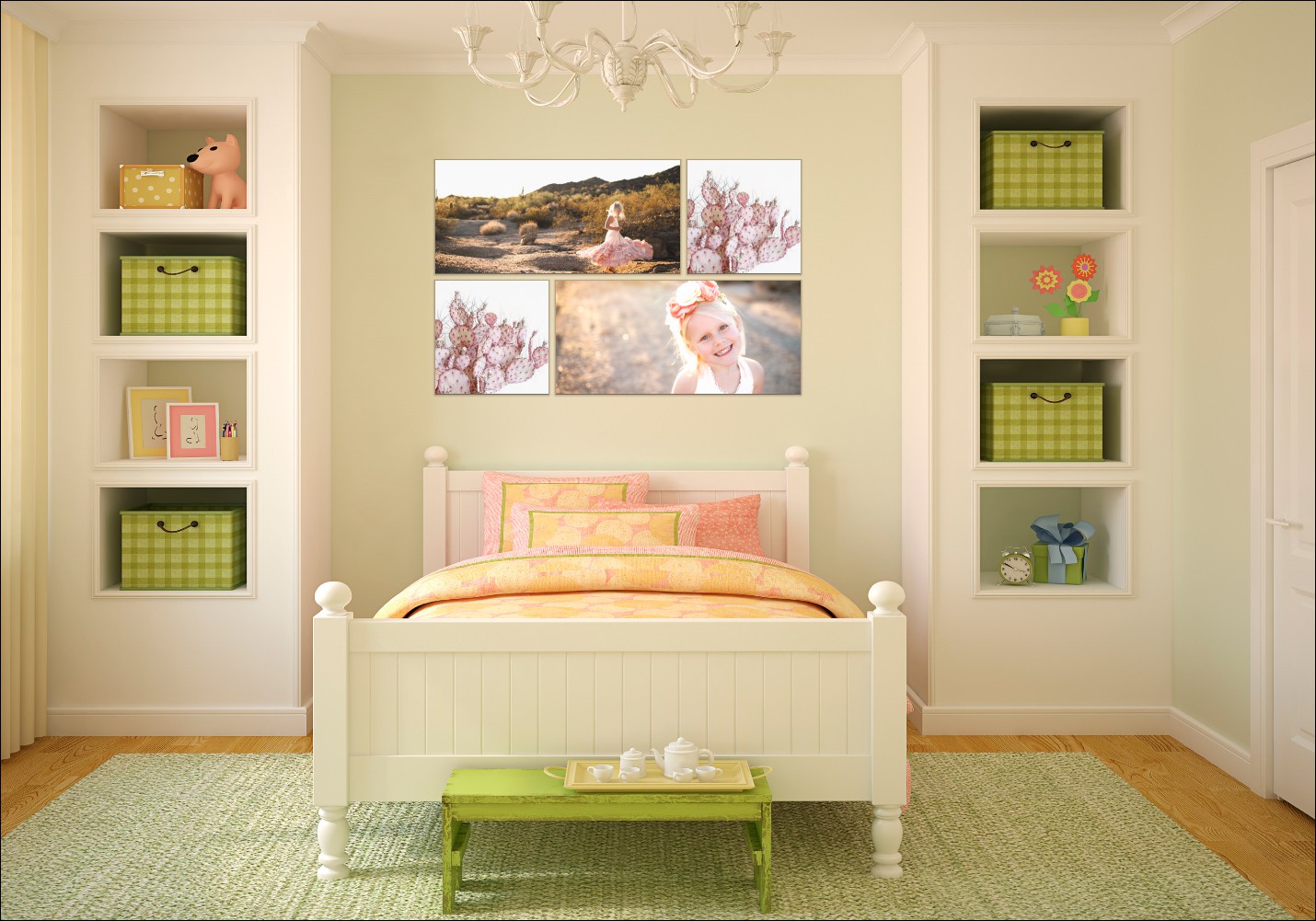
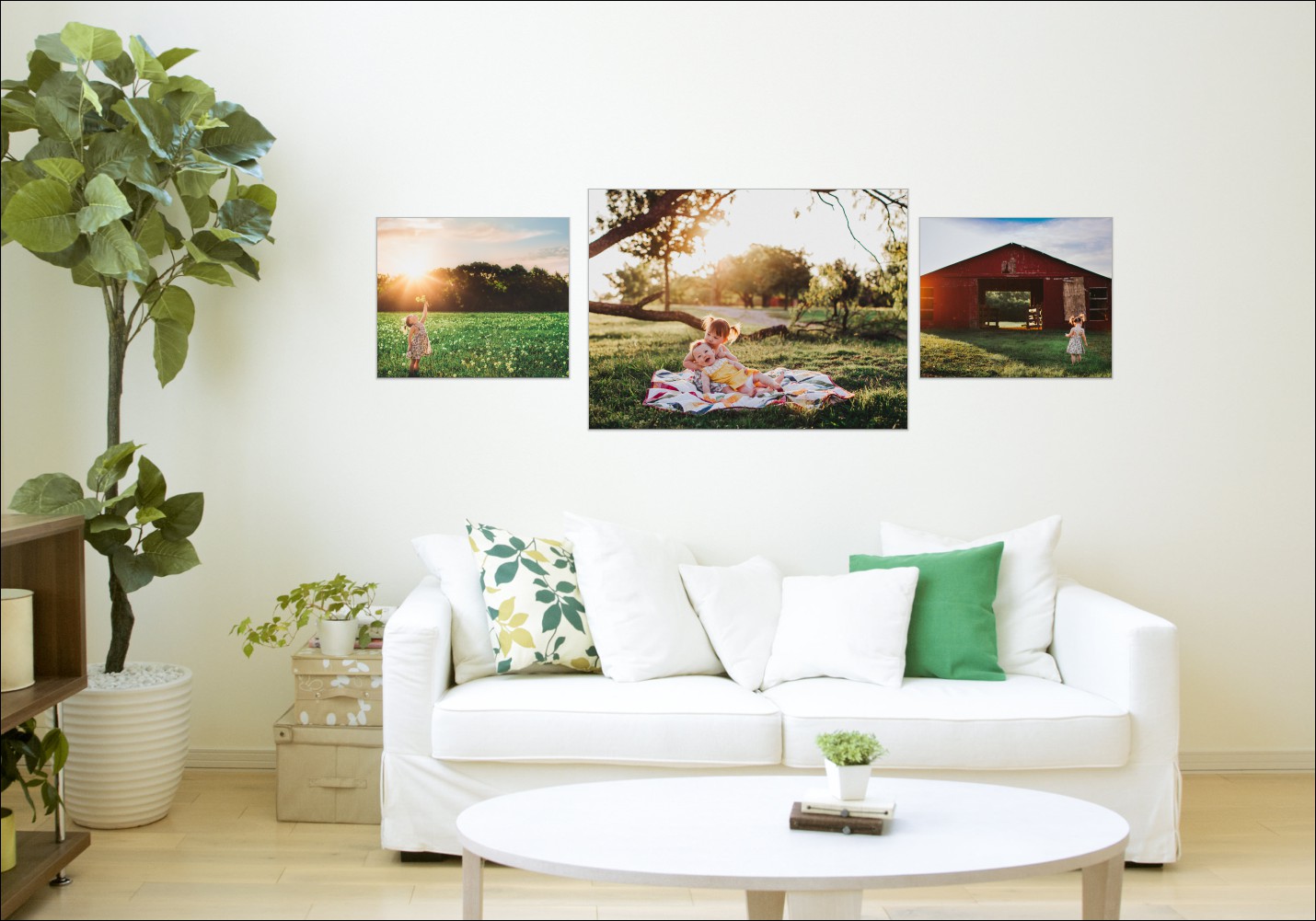
<p style="padding-left: 30px;"><span style="font-weight: 400;">Clients must first mentally picture photographs in their home, before even picking up a camera. Some simple questions can help build the visual representation:</span></p>
<ul>
<li style="font-weight: 400;"><span style="font-weight: 400;">If we captured a truly special moment, where would you want this to be on display in your home?</span></li>
<li style="font-weight: 400;"><span style="font-weight: 400;">You said above the sofa would be a good place to hang some photos – is that a two-person sofa or a three-person sofa?</span></li>
<li style="font-weight: 400;"><span style="font-weight: 400;">Do you have a color pattern or theme already in place?</span></li>
<li style="font-weight: 400;"><span style="font-weight: 400;">How much space do you have available to display your photos?</span></li>
</ul>
<p><img loading="lazy" decoding="async" class="aligncenter wp-image-3656" src="http://s3.amazonaws.com/artsy-cdn/static/assets/img/wordpress-artifacts/2018/06/08105822/Room-2.jpg" alt="Room-2-Fundy" width="601" height="420" srcset="https://s3.amazonaws.com/artsy-cdn/static/assets/img/wordpress-artifacts/2018/06/08105822/Room-2.jpg 1430w, https://s3.amazonaws.com/artsy-cdn/static/assets/img/wordpress-artifacts/2018/06/08105822/Room-2-300x210.jpg 300w, https://s3.amazonaws.com/artsy-cdn/static/assets/img/wordpress-artifacts/2018/06/08105822/Room-2-768x538.jpg 768w, https://s3.amazonaws.com/artsy-cdn/static/assets/img/wordpress-artifacts/2018/06/08105822/Room-2-429x300.jpg 429w" sizes="(max-width: 601px) 100vw, 601px" /></p>
<h2 style="padding-left: 30px;"><b>2. Set a Budget</b></h2>
<p style="padding-left: 30px;"><span style="font-weight: 400;">It’s not unusual for clients to balk at the cost of printed products when first presented to them.  Typically, we’re not disclosing these product lists until after the shoot, and by this point they have already invested into the session. If you prepare your clients in advance and help them to understand what a budget may consist of, you’ll find these conversations much easier to have.</span></p>
<p style="padding-left: 30px;"><span style="font-weight: 400;">Give them a friendly quote so they can figure out their own budget. A great phrase to use is: “Clients choose to spend anything from $50 to $5,000, but most of my clients end up investing around $2,500.”</span></p>
<p style="padding-left: 30px;"><span style="font-weight: 400;">Your numbers may be higher, they may be lower, but your clients need a budget in their head before they go into a shoot.</span></p>
<p><img loading="lazy" decoding="async" class="wp-image-3654 aligncenter" src="http://s3.amazonaws.com/artsy-cdn/static/assets/img/wordpress-artifacts/2018/06/08105740/rawpixel-649916-unsplash.jpg" alt="Budgeting" width="601" height="480" srcset="https://s3.amazonaws.com/artsy-cdn/static/assets/img/wordpress-artifacts/2018/06/08105740/rawpixel-649916-unsplash.jpg 3000w, https://s3.amazonaws.com/artsy-cdn/static/assets/img/wordpress-artifacts/2018/06/08105740/rawpixel-649916-unsplash-300x239.jpg 300w, https://s3.amazonaws.com/artsy-cdn/static/assets/img/wordpress-artifacts/2018/06/08105740/rawpixel-649916-unsplash-768x613.jpg 768w, https://s3.amazonaws.com/artsy-cdn/static/assets/img/wordpress-artifacts/2018/06/08105740/rawpixel-649916-unsplash-376x300.jpg 376w" sizes="(max-width: 601px) 100vw, 601px" /></p>
<h2 style="padding-left: 30px;"><b>3. Show Collections, Not Individuals</b></h2>
<p style="padding-left: 30px;"><span style="font-weight: 400;">Selling individual prints is hard. Clients want to see what their “dream” wall will look like, and may show you samples from Pinterest or Instagram for ideas. Use tools like Fundy Designer to design your own wall collections and price them as groupings, not individual photos. Fundy Designer has a number of pre-made wall art designs. There is even one with hand-lettered text for a more modern look and feel.</span></p>
<p>&nbsp;</p>
<p><img loading="lazy" decoding="async" class=" wp-image-3657 aligncenter" src="http://s3.amazonaws.com/artsy-cdn/static/assets/img/wordpress-artifacts/2018/06/08105825/Room-3.jpg" alt="Room-3-Fundy" width="601" height="420" srcset="https://s3.amazonaws.com/artsy-cdn/static/assets/img/wordpress-artifacts/2018/06/08105825/Room-3.jpg 1430w, https://s3.amazonaws.com/artsy-cdn/static/assets/img/wordpress-artifacts/2018/06/08105825/Room-3-300x210.jpg 300w, https://s3.amazonaws.com/artsy-cdn/static/assets/img/wordpress-artifacts/2018/06/08105825/Room-3-768x538.jpg 768w, https://s3.amazonaws.com/artsy-cdn/static/assets/img/wordpress-artifacts/2018/06/08105825/Room-3-429x300.jpg 429w" sizes="(max-width: 601px) 100vw, 601px" /></p>
<h2 style="padding-left: 30px;"><b>4. Show Designs On Your Clients’ Walls</b></h2>
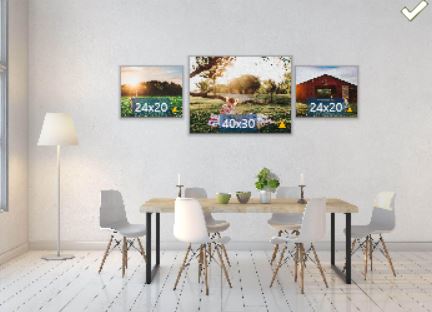
<p style="padding-left: 30px;"><span style="font-weight: 400;">One of the most powerful things that a good piece of software can do for you is help you show wall art ON your clients walls. Here is how to achieve this:</span></p>
<ol>
<li style="font-weight: 400;"><span style="font-weight: 400;">Have your client snap a photo of their living room wall, for example. Make sure that they get the bottom edge and top edge of the wall. (You just need to know how big something is in the frame. If their house is a typical house the U.S., their walls are 8.5 feet high.) </span></li>
<li style="font-weight: 400;"><span style="font-weight: 400;">When your clients email you the photo, you can load it into a tool like Fundy Designer that lets you measure the room and show the wall art to scale in their living room. </span></li>
<li style="font-weight: 400;"><span style="font-weight: 400;">If you are presenting on a projector or large screen, you can present at actual size (or close to). This will let your clients know just how small an 11&#215;14” vs. a 24&#215;36” actually is.</span></li>
</ol>
<p><img loading="lazy" decoding="async" class="aligncenter size-full wp-image-3659" src="http://s3.amazonaws.com/artsy-cdn/static/assets/img/wordpress-artifacts/2018/06/08105827/Room2_FundyMock-Up.jpg" alt="Room2_FundyMock-Up" width="432" height="312" srcset="https://s3.amazonaws.com/artsy-cdn/static/assets/img/wordpress-artifacts/2018/06/08105827/Room2_FundyMock-Up.jpg 432w, https://s3.amazonaws.com/artsy-cdn/static/assets/img/wordpress-artifacts/2018/06/08105827/Room2_FundyMock-Up-300x217.jpg 300w, https://s3.amazonaws.com/artsy-cdn/static/assets/img/wordpress-artifacts/2018/06/08105827/Room2_FundyMock-Up-415x300.jpg 415w" sizes="(max-width: 432px) 100vw, 432px" /></p>
<h2 style="padding-left: 30px;"><b>5. Include Your Designs in the Slideshow</b></h2>
<p style="padding-left: 30px;"><span style="font-weight: 400;">We all know that opening with a slideshow is an incredible way to evoke emotion. One feature we love about Fundy Designer is the ability to include the wall art collections we create beforehand in the slideshow. You can include all the photos or just the wow shots. You can also add a series of wall collections designed on stock rooms or your clients’ rooms. So before they even start deciding what they want, we can activate that designer for wall art.</span></p>
<p><img loading="lazy" decoding="async" class="aligncenter wp-image-3655 " src="http://s3.amazonaws.com/artsy-cdn/static/assets/img/wordpress-artifacts/2018/06/08105820/Room-1-e1528470285467.jpg" alt="Room-1-Fundy" width="602" height="484" srcset="https://s3.amazonaws.com/artsy-cdn/static/assets/img/wordpress-artifacts/2018/06/08105820/Room-1-e1528470285467.jpg 1233w, https://s3.amazonaws.com/artsy-cdn/static/assets/img/wordpress-artifacts/2018/06/08105820/Room-1-e1528470285467-300x242.jpg 300w, https://s3.amazonaws.com/artsy-cdn/static/assets/img/wordpress-artifacts/2018/06/08105820/Room-1-e1528470285467-768x619.jpg 768w, https://s3.amazonaws.com/artsy-cdn/static/assets/img/wordpress-artifacts/2018/06/08105820/Room-1-e1528470285467-373x300.jpg 373w" sizes="(max-width: 602px) 100vw, 602px" /></p>
<h2 style="padding-left: 30px;"><b>A Streamlined Sales Experience</b></h2>
<p style="padding-left: 30px;"><span style="font-weight: 400;">It’s essential to have a streamlined sales experience, using a professional tool, for your clients. Fundy Designer includes the ability to have clients pick their favorites, compare photos, create orders with album designs, wall art, loose prints, cards, or any product under the sun. Then, it produces a professional order sheet for your clients to sign!</span></p>
<hr />
<p><img loading="lazy" decoding="async" class="wp-image-3664 alignleft" src="http://s3.amazonaws.com/artsy-cdn/static/assets/img/wordpress-artifacts/2018/06/08113213/static1.squarespace.png" alt="Fundy-Logo" width="121" height="69" srcset="https://s3.amazonaws.com/artsy-cdn/static/assets/img/wordpress-artifacts/2018/06/08113213/static1.squarespace.png 503w, https://s3.amazonaws.com/artsy-cdn/static/assets/img/wordpress-artifacts/2018/06/08113213/static1.squarespace-300x171.png 300w" sizes="(max-width: 121px) 100vw, 121px" /></p>
<h3>Want to provide your clients with mock-ups like the ones you&#8217;ve seen in this blog post? All wall mock-up photos in were designed using Fundy Designer Software. To get your FREE trial, <a href="http://fundydesigner.com/downloads/">click here</a>.</h3>
<hr />
<h3 dir="ltr">About the Author: Andrew Funderburg, <a href="http://fundydesigner.com/">Fundy Designer</a></h3>
<p><img loading="lazy" decoding="async" class=" wp-image-3667 alignleft" src="http://s3.amazonaws.com/artsy-cdn/static/assets/img/wordpress-artifacts/2018/06/08160745/800.jpeg" alt="Fundy" width="160" height="160" srcset="https://s3.amazonaws.com/artsy-cdn/static/assets/img/wordpress-artifacts/2018/06/08160745/800.jpeg 800w, https://s3.amazonaws.com/artsy-cdn/static/assets/img/wordpress-artifacts/2018/06/08160745/800-150x150.jpeg 150w, https://s3.amazonaws.com/artsy-cdn/static/assets/img/wordpress-artifacts/2018/06/08160745/800-300x300.jpeg 300w, https://s3.amazonaws.com/artsy-cdn/static/assets/img/wordpress-artifacts/2018/06/08160745/800-768x768.jpeg 768w" sizes="(max-width: 160px) 100vw, 160px" /></p>
<p dir="ltr">Andrew “Fundy” Funderburg, photography expert and industry visionary, has a passion for people, capturing emotions and telling their stories through print. Andrew is the creator of Fundy Design Suite software and the founder of Fundy Software.  <i><b></b></i></p>
<p dir="ltr">The Fundy Suite has transformed countless photography businesses and facilitated the production of millions of photo stories worldwide. The software design tools are simple and efficient for the busy photographer looking to capture the emotions of the moment and lay out the story of their clients with albums and wall art. Fundy continues to lead innovation and personally inspire photographers worldwide with his stories and a common sense approach to photo layout and the art of storytelling.<i><b></b></i></p>
<p dir="ltr">Fundy speaks four languages fluently, holds a BA degree in English Literature from the University of Oregon, was a former Peace Corps volunteer in the Republic of Moldova, an Iron Chef Photographer in Japan, and has traveled the outer reaches of the planet preaching about the power for printed photography.</p>
<hr />
<p>Enjoy this post? Here are some more articles you may enjoy!</p>
<ul>
<li style="padding-left: 30px;"><a href="https://www.artsycouture.com/blog/great-gift-ideas-for-dad-this-fathers-day/">Great Gift Ideas for Dad This Father&#8217;s Day</a></li>
<li style="padding-left: 30px;"><a href="https://www.artsycouture.com/blog/getting-started-facebook-advertising/">Getting Started With Facebook Advertising</a></li>
<li style="padding-left: 30px;"><a href="https://www.artsycouture.com/blog/on1-effects-software">ON1 Effects Software from Photo RAW 2018</a></li>
</ul>
<p><a href="https://visitor.r20.constantcontact.com/d.jsp?llr=pcskd6lab&amp;p=oi&amp;m=1112299358287&amp;sit=bqge7ishb&amp;f=ac18114c-29cf-4013-b4ce-9c8cad401995"><img loading="lazy" decoding="async" class="aligncenter wp-image-3530 size-full" src="http://s3.amazonaws.com/artsy-cdn/static/assets/img/wordpress-artifacts/2018/05/09123810/900_AC_Blog_POST_Signup.png" alt="" width="900" height="220" srcset="https://s3.amazonaws.com/artsy-cdn/static/assets/img/wordpress-artifacts/2018/05/09123810/900_AC_Blog_POST_Signup.png 900w, https://s3.amazonaws.com/artsy-cdn/static/assets/img/wordpress-artifacts/2018/05/09123810/900_AC_Blog_POST_Signup-300x73.png 300w, https://s3.amazonaws.com/artsy-cdn/static/assets/img/wordpress-artifacts/2018/05/09123810/900_AC_Blog_POST_Signup-768x188.png 768w" sizes="(max-width: 900px) 100vw, 900px" /></a></p>
<p>&nbsp;</p>
<p>&nbsp;</p>
{"id":3647,"date":"2018-06-08T14:23:24","date_gmt":"2018-06-08T18:23:24","guid":{"rendered":"http:\/\/www.artsycouture.com\/blog\/?p=3647"},"modified":"2018-06-08T16:15:48","modified_gmt":"2018-06-08T20:15:48","slug":"sell-metal-prints-like-pro","status":"publish","type":"post","link":"https:\/\/www.artsycouture.com\/blog\/sell-metal-prints-like-pro\/","title":{"rendered":"How to Sell Metal Prints Like a Pro"},"content":{"rendered":"<p><span style=\"font-weight: 400;\">As professional photographers, our clients often rely on us to help them brainstorm ideas for displaying their photographs. It\u2019s normal to struggle with this; after all, we are typically focused on the image, not the product. However, creating a visual for clients to see and get inspired by their photography is an important part of in-person sales and will help to substantially increase your revenue. In this blog post, we\u2019ll focus on five strategies that are guaranteed to help you sell more beautiful Artsy Couture metal prints.<\/span><\/p>\n<h2 style=\"padding-left: 30px;\"><b>1. The Mental Picture<\/b><\/h2>\n<p style=\"padding-left: 30px;\"><span style=\"font-weight: 400;\">Clients must first mentally picture photographs in their home, before even picking up a camera. Some simple questions can help build the visual representation:<\/span><\/p>\n<ul>\n<li style=\"font-weight: 400;\"><span style=\"font-weight: 400;\">If we captured a truly special moment, where would you want this to be on display in your home?<\/span><\/li>\n<li style=\"font-weight: 400;\"><span style=\"font-weight: 400;\">You said above the sofa would be a good place to hang some photos \u2013 is that a two-person sofa or a three-person sofa?<\/span><\/li>\n<li style=\"font-weight: 400;\"><span style=\"font-weight: 400;\">Do you have a color pattern or theme already in place?<\/span><\/li>\n<li style=\"font-weight: 400;\"><span style=\"font-weight: 400;\">How much space do you have available to display your photos?<\/span><\/li>\n<\/ul>\n<p><img loading=\"lazy\" decoding=\"async\" class=\"aligncenter wp-image-3656\" src=\"http:\/\/s3.amazonaws.com\/artsy-cdn\/static\/assets\/img\/wordpress-artifacts\/2018\/06\/08105822\/Room-2.jpg\" alt=\"Room-2-Fundy\" width=\"601\" height=\"420\" srcset=\"https:\/\/s3.amazonaws.com\/artsy-cdn\/static\/assets\/img\/wordpress-artifacts\/2018\/06\/08105822\/Room-2.jpg 1430w, https:\/\/s3.amazonaws.com\/artsy-cdn\/static\/assets\/img\/wordpress-artifacts\/2018\/06\/08105822\/Room-2-300x210.jpg 300w, https:\/\/s3.amazonaws.com\/artsy-cdn\/static\/assets\/img\/wordpress-artifacts\/2018\/06\/08105822\/Room-2-768x538.jpg 768w, https:\/\/s3.amazonaws.com\/artsy-cdn\/static\/assets\/img\/wordpress-artifacts\/2018\/06\/08105822\/Room-2-429x300.jpg 429w\" sizes=\"(max-width: 601px) 100vw, 601px\" \/><\/p>\n<h2 style=\"padding-left: 30px;\"><b>2. Set a Budget<\/b><\/h2>\n<p style=\"padding-left: 30px;\"><span style=\"font-weight: 400;\">It\u2019s not unusual for clients to balk at the cost of printed products when first presented to them. \u00a0Typically, we\u2019re not disclosing these product lists until after the shoot, and by this point they have already invested into the session. If you prepare your clients in advance and help them to understand what a budget may consist of, you\u2019ll find these conversations much easier to have.<\/span><\/p>\n<p style=\"padding-left: 30px;\"><span style=\"font-weight: 400;\">Give them a friendly quote so they can figure out their own budget. A great phrase to use is: \u201cClients choose to spend anything from $50 to $5,000, but most of my clients end up investing around $2,500.\u201d<\/span><\/p>\n<p style=\"padding-left: 30px;\"><span style=\"font-weight: 400;\">Your numbers may be higher, they may be lower, but your clients need a budget in their head before they go into a shoot.<\/span><\/p>\n<p><img loading=\"lazy\" decoding=\"async\" class=\"wp-image-3654 aligncenter\" src=\"http:\/\/s3.amazonaws.com\/artsy-cdn\/static\/assets\/img\/wordpress-artifacts\/2018\/06\/08105740\/rawpixel-649916-unsplash.jpg\" alt=\"Budgeting\" width=\"601\" height=\"480\" srcset=\"https:\/\/s3.amazonaws.com\/artsy-cdn\/static\/assets\/img\/wordpress-artifacts\/2018\/06\/08105740\/rawpixel-649916-unsplash.jpg 3000w, https:\/\/s3.amazonaws.com\/artsy-cdn\/static\/assets\/img\/wordpress-artifacts\/2018\/06\/08105740\/rawpixel-649916-unsplash-300x239.jpg 300w, https:\/\/s3.amazonaws.com\/artsy-cdn\/static\/assets\/img\/wordpress-artifacts\/2018\/06\/08105740\/rawpixel-649916-unsplash-768x613.jpg 768w, https:\/\/s3.amazonaws.com\/artsy-cdn\/static\/assets\/img\/wordpress-artifacts\/2018\/06\/08105740\/rawpixel-649916-unsplash-376x300.jpg 376w\" sizes=\"(max-width: 601px) 100vw, 601px\" \/><\/p>\n<h2 style=\"padding-left: 30px;\"><b>3. Show Collections, Not Individuals<\/b><\/h2>\n<p style=\"padding-left: 30px;\"><span style=\"font-weight: 400;\">Selling individual prints is hard. Clients want to see what their \u201cdream\u201d wall will look like, and may show you samples from Pinterest or Instagram for ideas. Use tools like Fundy Designer to design your own wall collections and price them as groupings, not individual photos. Fundy Designer has a number of pre-made wall art designs. There is even one with hand-lettered text for a more modern look and feel.<\/span><\/p>\n<p>&nbsp;<\/p>\n<p><img loading=\"lazy\" decoding=\"async\" class=\" wp-image-3657 aligncenter\" src=\"http:\/\/s3.amazonaws.com\/artsy-cdn\/static\/assets\/img\/wordpress-artifacts\/2018\/06\/08105825\/Room-3.jpg\" alt=\"Room-3-Fundy\" width=\"601\" height=\"420\" srcset=\"https:\/\/s3.amazonaws.com\/artsy-cdn\/static\/assets\/img\/wordpress-artifacts\/2018\/06\/08105825\/Room-3.jpg 1430w, https:\/\/s3.amazonaws.com\/artsy-cdn\/static\/assets\/img\/wordpress-artifacts\/2018\/06\/08105825\/Room-3-300x210.jpg 300w, https:\/\/s3.amazonaws.com\/artsy-cdn\/static\/assets\/img\/wordpress-artifacts\/2018\/06\/08105825\/Room-3-768x538.jpg 768w, https:\/\/s3.amazonaws.com\/artsy-cdn\/static\/assets\/img\/wordpress-artifacts\/2018\/06\/08105825\/Room-3-429x300.jpg 429w\" sizes=\"(max-width: 601px) 100vw, 601px\" \/><\/p>\n<h2 style=\"padding-left: 30px;\"><b>4. Show Designs On Your Clients\u2019 Walls<\/b><\/h2>\n<p style=\"padding-left: 30px;\"><span style=\"font-weight: 400;\">One of the most powerful things that a good piece of software can do for you is help you show wall art ON your clients walls. Here is how to achieve this:<\/span><\/p>\n<ol>\n<li style=\"font-weight: 400;\"><span style=\"font-weight: 400;\">Have your client snap a photo of their living room wall, for example. Make sure that they get the bottom edge and top edge of the wall. (You just need to know how big something is in the frame. If their house is a typical house the U.S., their walls are 8.5 feet high.) <\/span><\/li>\n<li style=\"font-weight: 400;\"><span style=\"font-weight: 400;\">When your clients email you the photo, you can load it into a tool like Fundy Designer that lets you measure the room and show the wall art to scale in their living room. <\/span><\/li>\n<li style=\"font-weight: 400;\"><span style=\"font-weight: 400;\">If you are presenting on a projector or large screen, you can present at actual size (or close to). This will let your clients know just how small an 11&#215;14\u201d vs. a 24&#215;36\u201d actually is.<\/span><\/li>\n<\/ol>\n<p><img loading=\"lazy\" decoding=\"async\" class=\"aligncenter size-full wp-image-3659\" src=\"http:\/\/s3.amazonaws.com\/artsy-cdn\/static\/assets\/img\/wordpress-artifacts\/2018\/06\/08105827\/Room2_FundyMock-Up.jpg\" alt=\"Room2_FundyMock-Up\" width=\"432\" height=\"312\" srcset=\"https:\/\/s3.amazonaws.com\/artsy-cdn\/static\/assets\/img\/wordpress-artifacts\/2018\/06\/08105827\/Room2_FundyMock-Up.jpg 432w, https:\/\/s3.amazonaws.com\/artsy-cdn\/static\/assets\/img\/wordpress-artifacts\/2018\/06\/08105827\/Room2_FundyMock-Up-300x217.jpg 300w, https:\/\/s3.amazonaws.com\/artsy-cdn\/static\/assets\/img\/wordpress-artifacts\/2018\/06\/08105827\/Room2_FundyMock-Up-415x300.jpg 415w\" sizes=\"(max-width: 432px) 100vw, 432px\" \/><\/p>\n<h2 style=\"padding-left: 30px;\"><b>5. Include Your Designs in the Slideshow<\/b><\/h2>\n<p style=\"padding-left: 30px;\"><span style=\"font-weight: 400;\">We all know that opening with a slideshow is an incredible way to evoke emotion. One feature we love about Fundy Designer is the ability to include the wall art collections we create beforehand in the slideshow. You can include all the photos or just the wow shots. You can also add a series of wall collections designed on stock rooms or your clients\u2019 rooms. So before they even start deciding what they want, we can activate that designer for wall art.<\/span><\/p>\n<p><img loading=\"lazy\" decoding=\"async\" class=\"aligncenter wp-image-3655 \" src=\"http:\/\/s3.amazonaws.com\/artsy-cdn\/static\/assets\/img\/wordpress-artifacts\/2018\/06\/08105820\/Room-1-e1528470285467.jpg\" alt=\"Room-1-Fundy\" width=\"602\" height=\"484\" srcset=\"https:\/\/s3.amazonaws.com\/artsy-cdn\/static\/assets\/img\/wordpress-artifacts\/2018\/06\/08105820\/Room-1-e1528470285467.jpg 1233w, https:\/\/s3.amazonaws.com\/artsy-cdn\/static\/assets\/img\/wordpress-artifacts\/2018\/06\/08105820\/Room-1-e1528470285467-300x242.jpg 300w, https:\/\/s3.amazonaws.com\/artsy-cdn\/static\/assets\/img\/wordpress-artifacts\/2018\/06\/08105820\/Room-1-e1528470285467-768x619.jpg 768w, https:\/\/s3.amazonaws.com\/artsy-cdn\/static\/assets\/img\/wordpress-artifacts\/2018\/06\/08105820\/Room-1-e1528470285467-373x300.jpg 373w\" sizes=\"(max-width: 602px) 100vw, 602px\" \/><\/p>\n<h2 style=\"padding-left: 30px;\"><b>A Streamlined Sales Experience<\/b><\/h2>\n<p style=\"padding-left: 30px;\"><span style=\"font-weight: 400;\">It\u2019s essential to have a streamlined sales experience, using a professional tool, for your clients. Fundy Designer includes the ability to have clients pick their favorites, compare photos, create orders with album designs, wall art, loose prints, cards, or any product under the sun. Then, it produces a professional order sheet for your clients to sign!<\/span><\/p>\n<hr \/>\n<p><img loading=\"lazy\" decoding=\"async\" class=\"wp-image-3664 alignleft\" src=\"http:\/\/s3.amazonaws.com\/artsy-cdn\/static\/assets\/img\/wordpress-artifacts\/2018\/06\/08113213\/static1.squarespace.png\" alt=\"Fundy-Logo\" width=\"121\" height=\"69\" srcset=\"https:\/\/s3.amazonaws.com\/artsy-cdn\/static\/assets\/img\/wordpress-artifacts\/2018\/06\/08113213\/static1.squarespace.png 503w, https:\/\/s3.amazonaws.com\/artsy-cdn\/static\/assets\/img\/wordpress-artifacts\/2018\/06\/08113213\/static1.squarespace-300x171.png 300w\" sizes=\"(max-width: 121px) 100vw, 121px\" \/><\/p>\n<h3>Want to provide your clients with mock-ups like the ones\u00a0you&#8217;ve seen in this blog post? All wall mock-up photos in were designed using Fundy Designer Software. To get your FREE trial, <a href=\"http:\/\/fundydesigner.com\/downloads\/\">click here<\/a>.<\/h3>\n<hr \/>\n<h3 dir=\"ltr\">About the Author: Andrew Funderburg, <a href=\"http:\/\/fundydesigner.com\/\">Fundy Designer<\/a><\/h3>\n<p><img loading=\"lazy\" decoding=\"async\" class=\" wp-image-3667 alignleft\" src=\"http:\/\/s3.amazonaws.com\/artsy-cdn\/static\/assets\/img\/wordpress-artifacts\/2018\/06\/08160745\/800.jpeg\" alt=\"Fundy\" width=\"160\" height=\"160\" srcset=\"https:\/\/s3.amazonaws.com\/artsy-cdn\/static\/assets\/img\/wordpress-artifacts\/2018\/06\/08160745\/800.jpeg 800w, https:\/\/s3.amazonaws.com\/artsy-cdn\/static\/assets\/img\/wordpress-artifacts\/2018\/06\/08160745\/800-150x150.jpeg 150w, https:\/\/s3.amazonaws.com\/artsy-cdn\/static\/assets\/img\/wordpress-artifacts\/2018\/06\/08160745\/800-300x300.jpeg 300w, https:\/\/s3.amazonaws.com\/artsy-cdn\/static\/assets\/img\/wordpress-artifacts\/2018\/06\/08160745\/800-768x768.jpeg 768w\" sizes=\"(max-width: 160px) 100vw, 160px\" \/><\/p>\n<p dir=\"ltr\">Andrew \u201cFundy\u201d Funderburg, photography expert and industry visionary, has a passion for people, capturing emotions and telling their stories through print. Andrew is the creator of Fundy Design Suite software and the founder of Fundy Software. \u00a0<i><b><\/b><\/i><\/p>\n<p dir=\"ltr\">The Fundy Suite has transformed countless photography businesses and facilitated the production of millions of photo stories worldwide. The software design tools are simple and efficient for the busy photographer looking to capture the emotions of the moment and lay out the story of their clients with albums and wall art. Fundy continues to lead innovation and personally inspire photographers worldwide with his stories and a common sense approach to photo layout and the art of storytelling.<i><b><\/b><\/i><\/p>\n<p dir=\"ltr\">Fundy speaks four languages fluently, holds a BA degree in English Literature from the University of Oregon, was a former Peace Corps volunteer in the Republic of Moldova, an Iron Chef Photographer in Japan, and has traveled the outer reaches of the planet preaching about the power for printed photography.<\/p>\n<hr \/>\n<p>Enjoy\u00a0this post? Here are some more articles you may enjoy!<\/p>\n<ul>\n<li style=\"padding-left: 30px;\"><a href=\"https:\/\/www.artsycouture.com\/blog\/great-gift-ideas-for-dad-this-fathers-day\/\">Great Gift Ideas for Dad This Father&#8217;s Day<\/a><\/li>\n<li style=\"padding-left: 30px;\"><a href=\"https:\/\/www.artsycouture.com\/blog\/getting-started-facebook-advertising\/\">Getting Started With Facebook Advertising<\/a><\/li>\n<li style=\"padding-left: 30px;\"><a href=\"https:\/\/www.artsycouture.com\/blog\/on1-effects-software\">ON1 Effects Software from Photo RAW 2018<\/a><\/li>\n<\/ul>\n<p><a href=\"https:\/\/visitor.r20.constantcontact.com\/d.jsp?llr=pcskd6lab&amp;p=oi&amp;m=1112299358287&amp;sit=bqge7ishb&amp;f=ac18114c-29cf-4013-b4ce-9c8cad401995\"><img loading=\"lazy\" decoding=\"async\" class=\"aligncenter wp-image-3530 size-full\" src=\"http:\/\/s3.amazonaws.com\/artsy-cdn\/static\/assets\/img\/wordpress-artifacts\/2018\/05\/09123810\/900_AC_Blog_POST_Signup.png\" alt=\"\" width=\"900\" height=\"220\" srcset=\"https:\/\/s3.amazonaws.com\/artsy-cdn\/static\/assets\/img\/wordpress-artifacts\/2018\/05\/09123810\/900_AC_Blog_POST_Signup.png 900w, https:\/\/s3.amazonaws.com\/artsy-cdn\/static\/assets\/img\/wordpress-artifacts\/2018\/05\/09123810\/900_AC_Blog_POST_Signup-300x73.png 300w, https:\/\/s3.amazonaws.com\/artsy-cdn\/static\/assets\/img\/wordpress-artifacts\/2018\/05\/09123810\/900_AC_Blog_POST_Signup-768x188.png 768w\" sizes=\"(max-width: 900px) 100vw, 900px\" \/><\/a><\/p>\n<p>&nbsp;<\/p>\n<p>&nbsp;<\/p>\n","protected":false},"excerpt":{"rendered":null,"protected":false},"author":6,"featured_media":3663,"comment_status":"closed","ping_status":"closed","sticky":false,"template":"","format":"standard","meta":{"footnotes":""},"categories":[41,211,40,1],"tags":[70,76,238,53,93,56,35],"_links":{"self":[{"href":"https:\/\/www.artsycouture.com\/blog\/wp-json\/wp\/v2\/posts\/3647"}],"collection":[{"href":"https:\/\/www.artsycouture.com\/blog\/wp-json\/wp\/v2\/posts"}],"about":[{"href":"https:\/\/www.artsycouture.com\/blog\/wp-json\/wp\/v2\/types\/post"}],"author":[{"embeddable":true,"href":"https:\/\/www.artsycouture.com\/blog\/wp-json\/wp\/v2\/users\/6"}],"replies":[{"embeddable":true,"href":"https:\/\/www.artsycouture.com\/blog\/wp-json\/wp\/v2\/comments?post=3647"}],"version-history":[{"count":8,"href":"https:\/\/www.artsycouture.com\/blog\/wp-json\/wp\/v2\/posts\/3647\/revisions"}],"predecessor-version":[{"id":3668,"href":"https:\/\/www.artsycouture.com\/blog\/wp-json\/wp\/v2\/posts\/3647\/revisions\/3668"}],"wp:featuredmedia":[{"embeddable":true,"href":"https:\/\/www.artsycouture.com\/blog\/wp-json\/wp\/v2\/media\/3663"}],"wp:attachment":[{"href":"https:\/\/www.artsycouture.com\/blog\/wp-json\/wp\/v2\/media?parent=3647"}],"wp:term":[{"taxonomy":"category","embeddable":true,"href":"https:\/\/www.artsycouture.com\/blog\/wp-json\/wp\/v2\/categories?post=3647"},{"taxonomy":"post_tag","embeddable":true,"href":"https:\/\/www.artsycouture.com\/blog\/wp-json\/wp\/v2\/tags?post=3647"}],"curies":[{"name":"wp","href":"https:\/\/api.w.org\/{rel}","templated":true}]}}