<p><span style="font-weight: 400;">Recently, ON1 released the powerful Effects Module from its Photo RAW 2018 software as its own independent app. The app is available as either a standalone or a plugin for Lightroom and Photoshop. </span><span style="font-weight: 400;">I find the Effects Module to be a fantastic way to add that finishing touch to your photos in a very easy, intuitive, and non-destructive workflow. You can add stackable filters, presets, and much more while still maintaining complete control to fine-tune any option. </span></p>
<p><img loading="lazy" decoding="async" class="aligncenter wp-image-3550 size-full" src="http://s3.amazonaws.com/artsy-cdn/static/assets/img/wordpress-artifacts/2018/05/10105014/RAW-image-1.jpg" alt="ON1-effects-1" width="1600" height="858" srcset="https://s3.amazonaws.com/artsy-cdn/static/assets/img/wordpress-artifacts/2018/05/10105014/RAW-image-1.jpg 1600w, https://s3.amazonaws.com/artsy-cdn/static/assets/img/wordpress-artifacts/2018/05/10105014/RAW-image-1-300x161.jpg 300w, https://s3.amazonaws.com/artsy-cdn/static/assets/img/wordpress-artifacts/2018/05/10105014/RAW-image-1-768x412.jpg 768w, https://s3.amazonaws.com/artsy-cdn/static/assets/img/wordpress-artifacts/2018/05/10105014/RAW-image-1-559x300.jpg 559w" sizes="(max-width: 1600px) 100vw, 1600px" /></p>
<p style="padding-left: 30px;"><span style="font-weight: 400;">Once you open an image into the Effects Module you will see in the top left that you have a choice between Presets and Filters. Your Filter choices are conveniently grouped into categories such as Black and White, HDR Look, Textures, etc. Additionally, for the Presets you’ll have many options such as Landscapes, Sports, and Weddings.</span></p>
<p><img loading="lazy" decoding="async" class="aligncenter wp-image-3551 size-full" src="http://s3.amazonaws.com/artsy-cdn/static/assets/img/wordpress-artifacts/2018/05/10105023/RAW-image-2-e1525977173735.jpg" alt="ON1-effects-2" width="1600" height="860" srcset="https://s3.amazonaws.com/artsy-cdn/static/assets/img/wordpress-artifacts/2018/05/10105023/RAW-image-2-e1525977173735.jpg 1600w, https://s3.amazonaws.com/artsy-cdn/static/assets/img/wordpress-artifacts/2018/05/10105023/RAW-image-2-e1525977173735-300x161.jpg 300w, https://s3.amazonaws.com/artsy-cdn/static/assets/img/wordpress-artifacts/2018/05/10105023/RAW-image-2-e1525977173735-768x413.jpg 768w, https://s3.amazonaws.com/artsy-cdn/static/assets/img/wordpress-artifacts/2018/05/10105023/RAW-image-2-e1525977173735-558x300.jpg 558w" sizes="(max-width: 1600px) 100vw, 1600px" /></p>
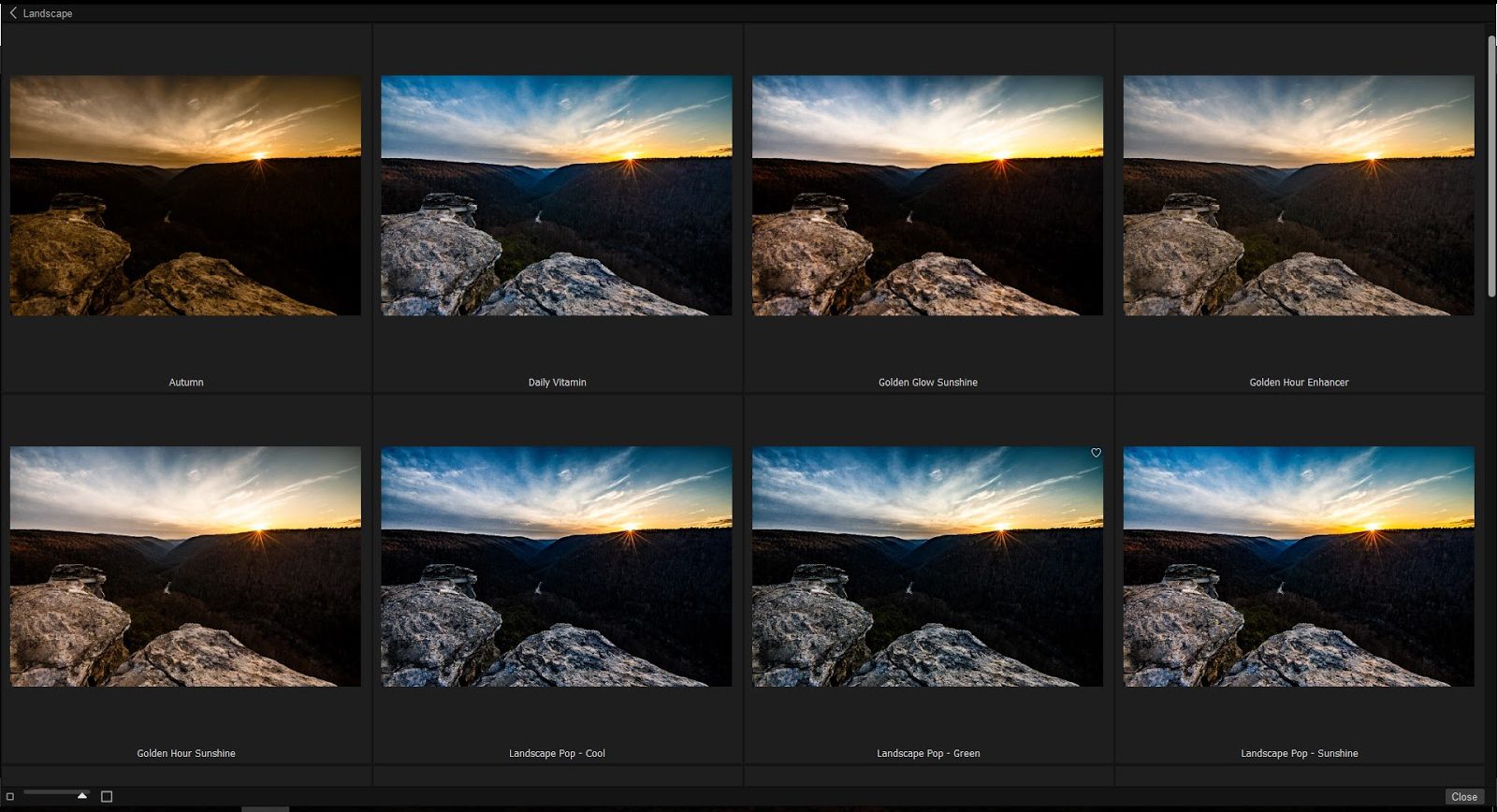
<p style="padding-left: 30px;"><span style="font-weight: 400;">The Presets are actually multiple Filters stacked together to create a certain look. Once you select a specific category, such as Landscapes, you will see a thumbnail icon called the Quick View Browser. This will lay out all the various preset styles on your screen making it easy to select the one you prefer. You can also vary the size of the thumbnails. I found this to be an excellent feature for sorting through your Preset options quickly.</span></p>
<p><img loading="lazy" decoding="async" class="aligncenter wp-image-3552 size-full" src="http://s3.amazonaws.com/artsy-cdn/static/assets/img/wordpress-artifacts/2018/05/10105029/RAW-image-3-e1525977199521.jpg" alt="ON1-effects-3" width="1600" height="868" srcset="https://s3.amazonaws.com/artsy-cdn/static/assets/img/wordpress-artifacts/2018/05/10105029/RAW-image-3-e1525977199521.jpg 1600w, https://s3.amazonaws.com/artsy-cdn/static/assets/img/wordpress-artifacts/2018/05/10105029/RAW-image-3-e1525977199521-300x163.jpg 300w, https://s3.amazonaws.com/artsy-cdn/static/assets/img/wordpress-artifacts/2018/05/10105029/RAW-image-3-e1525977199521-768x417.jpg 768w, https://s3.amazonaws.com/artsy-cdn/static/assets/img/wordpress-artifacts/2018/05/10105029/RAW-image-3-e1525977199521-553x300.jpg 553w" sizes="(max-width: 1600px) 100vw, 1600px" /></p>
<p style="padding-left: 30px;"><span style="font-weight: 400;">In this case, I chose the Magic Desert Preset for this image I took while hiking in West Virginia. You’ll see that you now have a variety of controls on the right side to make any adjustment you can imagine. The presets come in at full power so I often lower the master opacity slider. But for this image, I kept it at full opacity, increased the Vibrance, and then softened the Vignette and lowered the Detail sharpening. You can also do Local Adjustments, Masking and Blend Options and the possibilities seem endless. </span></p>
<p style="padding-left: 30px;"><span style="font-weight: 400;">For this first variation, I was just going for a subtle enhancement to make the colors pop a bit more. The various sliders allow you to make very delicate changes, or go for an extreme alternative. It’s all up to your artistic preferences.</span></p>
<p><img loading="lazy" decoding="async" class="aligncenter wp-image-3553 size-full" src="http://s3.amazonaws.com/artsy-cdn/static/assets/img/wordpress-artifacts/2018/05/10105035/RAW-image-4-e1525977226820.jpg" alt="ON1-effects-4" width="1600" height="856" srcset="https://s3.amazonaws.com/artsy-cdn/static/assets/img/wordpress-artifacts/2018/05/10105035/RAW-image-4-e1525977226820.jpg 1600w, https://s3.amazonaws.com/artsy-cdn/static/assets/img/wordpress-artifacts/2018/05/10105035/RAW-image-4-e1525977226820-300x161.jpg 300w, https://s3.amazonaws.com/artsy-cdn/static/assets/img/wordpress-artifacts/2018/05/10105035/RAW-image-4-e1525977226820-768x411.jpg 768w, https://s3.amazonaws.com/artsy-cdn/static/assets/img/wordpress-artifacts/2018/05/10105035/RAW-image-4-e1525977226820-561x300.jpg 561w" sizes="(max-width: 1600px) 100vw, 1600px" /></p>
<p style="padding-left: 30px;"><span style="font-weight: 400;">Here’s a completely different look with the Autumn Preset selected. I also added a Tone Enhancer Filter where I lightened the shadows and increased the Contrast, Detail, and Clarity.</span></p>
<p><img loading="lazy" decoding="async" class="aligncenter wp-image-3554 size-full" src="http://s3.amazonaws.com/artsy-cdn/static/assets/img/wordpress-artifacts/2018/05/10105042/RAW-image-5-e1525977262630.jpg" alt="ON1-effects-5" width="1600" height="860" srcset="https://s3.amazonaws.com/artsy-cdn/static/assets/img/wordpress-artifacts/2018/05/10105042/RAW-image-5-e1525977262630.jpg 1600w, https://s3.amazonaws.com/artsy-cdn/static/assets/img/wordpress-artifacts/2018/05/10105042/RAW-image-5-e1525977262630-300x161.jpg 300w, https://s3.amazonaws.com/artsy-cdn/static/assets/img/wordpress-artifacts/2018/05/10105042/RAW-image-5-e1525977262630-768x413.jpg 768w, https://s3.amazonaws.com/artsy-cdn/static/assets/img/wordpress-artifacts/2018/05/10105042/RAW-image-5-e1525977262630-558x300.jpg 558w" sizes="(max-width: 1600px) 100vw, 1600px" /></p>
<p><span style="font-weight: 400;">This is really fun stuff and I highly recommend you try out the ON1 Effects 2018 Software!</span></p>
<h2>Want to try On1 Effects 2018 for FREE? <a href="https://www.on1.com/promo/effects-2018/?partner=artsycouture">Click here to download today</a>!</h2>
<hr />
<h2><img loading="lazy" decoding="async" class="alignleft wp-image-3340" src="http://s3.amazonaws.com/artsy-cdn/static/assets/img/wordpress-artifacts/2018/03/09155520/0100-resized-e1525976338532-300x260.jpg" alt="Rob-Grant-Professional-Photographer" width="224" height="194" srcset="https://s3.amazonaws.com/artsy-cdn/static/assets/img/wordpress-artifacts/2018/03/09155520/0100-resized-e1525976338532-300x260.jpg 300w, https://s3.amazonaws.com/artsy-cdn/static/assets/img/wordpress-artifacts/2018/03/09155520/0100-resized-e1525976338532-346x300.jpg 346w, https://s3.amazonaws.com/artsy-cdn/static/assets/img/wordpress-artifacts/2018/03/09155520/0100-resized-e1525976338532.jpg 686w" sizes="(max-width: 224px) 100vw, 224px" />About the Author: Rob Grant, Artsy Couture</h2>
<p>Rob Grant is the in-house Photo Specialist at Artsy Couture, a professional photo printing resource based in Hunt Valley, MD. He is also an experienced professional photographer who has photographed over 800 weddings. His fine art photography has been exhibited in prestigious galleries nationwide including five images in the permanent collection of the <a href="http://americanhistory.si.edu/" target="_blank" rel="noopener">Smithsonian National Museum of American History.</a> In his free time, you can often find Rob rock climbing, hiking, or skiing (usually with a camera along for the ride!)</p>
<hr />
<p>Did you find this blog helpful? You might find these useful as well:</p>
<ul>
<li><a href="http://www.artsycouture.com/blog/product-review-on1-photo-raw-2018/">Product Review: On1 Photo RAW 2018.1</a></li>
<li><a href="http://www.artsycouture.com/blog/best-mobile-photo-tips-for-2018/">Best Mobile Photo Tips for 2018</a></li>
<li><a href="http://www.artsycouture.com/blog/website-tune-up-email-marketing/">Website Tune-Up: Email Marketing</a></li>
</ul>
<p><a href="https://visitor.r20.constantcontact.com/manage/optin?v=001be8wlSb0wQpk_wJ4C8onufJQjLwoCPrsilRKJwrGuTu1sZ7VDjDXQEQj5v1gwMiKzb9Du5DkMI0v-XPrLYiHSZT8oDgFjR1_WCNfsWljzhqLYANMPWc-Ce2jfD4EEYzcXFNxDUoVfrpBuhsXNA6WyJTF5tkOjFUDnQqnDl5-rMKgvILaXl_P0v4q68MJ94Ul"><img loading="lazy" decoding="async" class="alignnone wp-image-3530 size-full" src="http://s3.amazonaws.com/artsy-cdn/static/assets/img/wordpress-artifacts/2018/05/09123810/900_AC_Blog_POST_Signup.png" alt="" width="900" height="220" srcset="https://s3.amazonaws.com/artsy-cdn/static/assets/img/wordpress-artifacts/2018/05/09123810/900_AC_Blog_POST_Signup.png 900w, https://s3.amazonaws.com/artsy-cdn/static/assets/img/wordpress-artifacts/2018/05/09123810/900_AC_Blog_POST_Signup-300x73.png 300w, https://s3.amazonaws.com/artsy-cdn/static/assets/img/wordpress-artifacts/2018/05/09123810/900_AC_Blog_POST_Signup-768x188.png 768w" sizes="(max-width: 900px) 100vw, 900px" /></a></p>
{"id":3532,"date":"2018-05-10T14:20:29","date_gmt":"2018-05-10T18:20:29","guid":{"rendered":"http:\/\/54.236.63.242\/blog\/?p=3532"},"modified":"2018-05-11T09:17:54","modified_gmt":"2018-05-11T13:17:54","slug":"on1-effects-software","status":"publish","type":"post","link":"https:\/\/www.artsycouture.com\/blog\/on1-effects-software","title":{"rendered":"ON1 Effects Software from Photo RAW 2018"},"content":{"rendered":"<p><span style=\"font-weight: 400;\">Recently, ON1 released the powerful Effects Module from its Photo RAW 2018 software as its own independent app. The app is available as either a standalone or a plugin for Lightroom and Photoshop.\u00a0<\/span><span style=\"font-weight: 400;\">I find the Effects Module to be a fantastic way to add that finishing touch to your photos in a very easy, intuitive, and non-destructive workflow. You can add stackable filters, presets, and much more while still maintaining complete control to fine-tune any option.\u00a0<\/span><\/p>\n<p><img loading=\"lazy\" decoding=\"async\" class=\"aligncenter wp-image-3550 size-full\" src=\"http:\/\/s3.amazonaws.com\/artsy-cdn\/static\/assets\/img\/wordpress-artifacts\/2018\/05\/10105014\/RAW-image-1.jpg\" alt=\"ON1-effects-1\" width=\"1600\" height=\"858\" srcset=\"https:\/\/s3.amazonaws.com\/artsy-cdn\/static\/assets\/img\/wordpress-artifacts\/2018\/05\/10105014\/RAW-image-1.jpg 1600w, https:\/\/s3.amazonaws.com\/artsy-cdn\/static\/assets\/img\/wordpress-artifacts\/2018\/05\/10105014\/RAW-image-1-300x161.jpg 300w, https:\/\/s3.amazonaws.com\/artsy-cdn\/static\/assets\/img\/wordpress-artifacts\/2018\/05\/10105014\/RAW-image-1-768x412.jpg 768w, https:\/\/s3.amazonaws.com\/artsy-cdn\/static\/assets\/img\/wordpress-artifacts\/2018\/05\/10105014\/RAW-image-1-559x300.jpg 559w\" sizes=\"(max-width: 1600px) 100vw, 1600px\" \/><\/p>\n<p style=\"padding-left: 30px;\"><span style=\"font-weight: 400;\">Once you open an image into the Effects Module you will see in\u00a0the top left that you have a choice between Presets and Filters. Your Filter choices are conveniently grouped into categories such as Black and White, HDR Look, Textures, etc. Additionally, for the Presets you\u2019ll have many options such as Landscapes, Sports, and Weddings.<\/span><\/p>\n<p><img loading=\"lazy\" decoding=\"async\" class=\"aligncenter wp-image-3551 size-full\" src=\"http:\/\/s3.amazonaws.com\/artsy-cdn\/static\/assets\/img\/wordpress-artifacts\/2018\/05\/10105023\/RAW-image-2-e1525977173735.jpg\" alt=\"ON1-effects-2\" width=\"1600\" height=\"860\" srcset=\"https:\/\/s3.amazonaws.com\/artsy-cdn\/static\/assets\/img\/wordpress-artifacts\/2018\/05\/10105023\/RAW-image-2-e1525977173735.jpg 1600w, https:\/\/s3.amazonaws.com\/artsy-cdn\/static\/assets\/img\/wordpress-artifacts\/2018\/05\/10105023\/RAW-image-2-e1525977173735-300x161.jpg 300w, https:\/\/s3.amazonaws.com\/artsy-cdn\/static\/assets\/img\/wordpress-artifacts\/2018\/05\/10105023\/RAW-image-2-e1525977173735-768x413.jpg 768w, https:\/\/s3.amazonaws.com\/artsy-cdn\/static\/assets\/img\/wordpress-artifacts\/2018\/05\/10105023\/RAW-image-2-e1525977173735-558x300.jpg 558w\" sizes=\"(max-width: 1600px) 100vw, 1600px\" \/><\/p>\n<p style=\"padding-left: 30px;\"><span style=\"font-weight: 400;\">The Presets are actually multiple Filters stacked together to create a certain look. Once you select a specific category, such as Landscapes, you will see a thumbnail icon called the Quick View Browser. This will lay out all the various preset styles on your screen making it easy to select the one you prefer. You can also vary the size of the thumbnails. I found this to be an excellent feature for sorting through your Preset options quickly.<\/span><\/p>\n<p><img loading=\"lazy\" decoding=\"async\" class=\"aligncenter wp-image-3552 size-full\" src=\"http:\/\/s3.amazonaws.com\/artsy-cdn\/static\/assets\/img\/wordpress-artifacts\/2018\/05\/10105029\/RAW-image-3-e1525977199521.jpg\" alt=\"ON1-effects-3\" width=\"1600\" height=\"868\" srcset=\"https:\/\/s3.amazonaws.com\/artsy-cdn\/static\/assets\/img\/wordpress-artifacts\/2018\/05\/10105029\/RAW-image-3-e1525977199521.jpg 1600w, https:\/\/s3.amazonaws.com\/artsy-cdn\/static\/assets\/img\/wordpress-artifacts\/2018\/05\/10105029\/RAW-image-3-e1525977199521-300x163.jpg 300w, https:\/\/s3.amazonaws.com\/artsy-cdn\/static\/assets\/img\/wordpress-artifacts\/2018\/05\/10105029\/RAW-image-3-e1525977199521-768x417.jpg 768w, https:\/\/s3.amazonaws.com\/artsy-cdn\/static\/assets\/img\/wordpress-artifacts\/2018\/05\/10105029\/RAW-image-3-e1525977199521-553x300.jpg 553w\" sizes=\"(max-width: 1600px) 100vw, 1600px\" \/><\/p>\n<p style=\"padding-left: 30px;\"><span style=\"font-weight: 400;\">In this case, I chose the Magic Desert Preset for this image I took while hiking in West Virginia. You\u2019ll see that you now have a variety of controls on the right side to make any adjustment you can imagine. The presets come in at full power so I often lower the master opacity slider. But for this image, I kept it at full opacity, increased the Vibrance, and then softened the Vignette and lowered the Detail sharpening. You can also do Local Adjustments, Masking and Blend Options and the possibilities seem endless. <\/span><\/p>\n<p style=\"padding-left: 30px;\"><span style=\"font-weight: 400;\">For this first variation, I was just going for a subtle enhancement to make the colors pop a bit more. The various sliders allow you to make very delicate changes, or go for an extreme alternative. It\u2019s all up to your artistic preferences.<\/span><\/p>\n<p><img loading=\"lazy\" decoding=\"async\" class=\"aligncenter wp-image-3553 size-full\" src=\"http:\/\/s3.amazonaws.com\/artsy-cdn\/static\/assets\/img\/wordpress-artifacts\/2018\/05\/10105035\/RAW-image-4-e1525977226820.jpg\" alt=\"ON1-effects-4\" width=\"1600\" height=\"856\" srcset=\"https:\/\/s3.amazonaws.com\/artsy-cdn\/static\/assets\/img\/wordpress-artifacts\/2018\/05\/10105035\/RAW-image-4-e1525977226820.jpg 1600w, https:\/\/s3.amazonaws.com\/artsy-cdn\/static\/assets\/img\/wordpress-artifacts\/2018\/05\/10105035\/RAW-image-4-e1525977226820-300x161.jpg 300w, https:\/\/s3.amazonaws.com\/artsy-cdn\/static\/assets\/img\/wordpress-artifacts\/2018\/05\/10105035\/RAW-image-4-e1525977226820-768x411.jpg 768w, https:\/\/s3.amazonaws.com\/artsy-cdn\/static\/assets\/img\/wordpress-artifacts\/2018\/05\/10105035\/RAW-image-4-e1525977226820-561x300.jpg 561w\" sizes=\"(max-width: 1600px) 100vw, 1600px\" \/><\/p>\n<p style=\"padding-left: 30px;\"><span style=\"font-weight: 400;\">Here\u2019s a completely different look with the Autumn Preset selected. I also added a Tone Enhancer Filter where I lightened the shadows and increased the Contrast, Detail, and Clarity.<\/span><\/p>\n<p><img loading=\"lazy\" decoding=\"async\" class=\"aligncenter wp-image-3554 size-full\" src=\"http:\/\/s3.amazonaws.com\/artsy-cdn\/static\/assets\/img\/wordpress-artifacts\/2018\/05\/10105042\/RAW-image-5-e1525977262630.jpg\" alt=\"ON1-effects-5\" width=\"1600\" height=\"860\" srcset=\"https:\/\/s3.amazonaws.com\/artsy-cdn\/static\/assets\/img\/wordpress-artifacts\/2018\/05\/10105042\/RAW-image-5-e1525977262630.jpg 1600w, https:\/\/s3.amazonaws.com\/artsy-cdn\/static\/assets\/img\/wordpress-artifacts\/2018\/05\/10105042\/RAW-image-5-e1525977262630-300x161.jpg 300w, https:\/\/s3.amazonaws.com\/artsy-cdn\/static\/assets\/img\/wordpress-artifacts\/2018\/05\/10105042\/RAW-image-5-e1525977262630-768x413.jpg 768w, https:\/\/s3.amazonaws.com\/artsy-cdn\/static\/assets\/img\/wordpress-artifacts\/2018\/05\/10105042\/RAW-image-5-e1525977262630-558x300.jpg 558w\" sizes=\"(max-width: 1600px) 100vw, 1600px\" \/><\/p>\n<p><span style=\"font-weight: 400;\">This is really fun stuff and I highly recommend you try out the ON1 Effects 2018 Software!<\/span><\/p>\n<h2>Want to try On1 Effects 2018 for FREE? <a href=\"https:\/\/www.on1.com\/promo\/effects-2018\/?partner=artsycouture\">Click here to download today<\/a>!<\/h2>\n<hr \/>\n<h2><img loading=\"lazy\" decoding=\"async\" class=\"alignleft wp-image-3340\" src=\"http:\/\/s3.amazonaws.com\/artsy-cdn\/static\/assets\/img\/wordpress-artifacts\/2018\/03\/09155520\/0100-resized-e1525976338532-300x260.jpg\" alt=\"Rob-Grant-Professional-Photographer\" width=\"224\" height=\"194\" srcset=\"https:\/\/s3.amazonaws.com\/artsy-cdn\/static\/assets\/img\/wordpress-artifacts\/2018\/03\/09155520\/0100-resized-e1525976338532-300x260.jpg 300w, https:\/\/s3.amazonaws.com\/artsy-cdn\/static\/assets\/img\/wordpress-artifacts\/2018\/03\/09155520\/0100-resized-e1525976338532-346x300.jpg 346w, https:\/\/s3.amazonaws.com\/artsy-cdn\/static\/assets\/img\/wordpress-artifacts\/2018\/03\/09155520\/0100-resized-e1525976338532.jpg 686w\" sizes=\"(max-width: 224px) 100vw, 224px\" \/>About the Author: Rob Grant, Artsy Couture<\/h2>\n<p>Rob Grant is the in-house Photo Specialist at Artsy Couture, a professional photo printing resource based in Hunt Valley, MD. He is also an experienced professional photographer who has photographed over 800 weddings. His fine art photography has been exhibited in prestigious galleries nationwide including five images in the permanent collection of the\u00a0<a href=\"http:\/\/americanhistory.si.edu\/\" target=\"_blank\" rel=\"noopener\">Smithsonian National Museum of American History.<\/a>\u00a0In his free time, you can often find Rob rock climbing, hiking, or skiing (usually with a camera along for the ride!)<\/p>\n<hr \/>\n<p>Did you find this blog helpful? You might find these useful as well:<\/p>\n<ul>\n<li><a href=\"http:\/\/www.artsycouture.com\/blog\/product-review-on1-photo-raw-2018\/\">Product Review: On1 Photo RAW 2018.1<\/a><\/li>\n<li><a href=\"http:\/\/www.artsycouture.com\/blog\/best-mobile-photo-tips-for-2018\/\">Best Mobile Photo Tips for 2018<\/a><\/li>\n<li><a href=\"http:\/\/www.artsycouture.com\/blog\/website-tune-up-email-marketing\/\">Website Tune-Up: Email Marketing<\/a><\/li>\n<\/ul>\n<p><a href=\"https:\/\/visitor.r20.constantcontact.com\/manage\/optin?v=001be8wlSb0wQpk_wJ4C8onufJQjLwoCPrsilRKJwrGuTu1sZ7VDjDXQEQj5v1gwMiKzb9Du5DkMI0v-XPrLYiHSZT8oDgFjR1_WCNfsWljzhqLYANMPWc-Ce2jfD4EEYzcXFNxDUoVfrpBuhsXNA6WyJTF5tkOjFUDnQqnDl5-rMKgvILaXl_P0v4q68MJ94Ul\"><img loading=\"lazy\" decoding=\"async\" class=\"alignnone wp-image-3530 size-full\" src=\"http:\/\/s3.amazonaws.com\/artsy-cdn\/static\/assets\/img\/wordpress-artifacts\/2018\/05\/09123810\/900_AC_Blog_POST_Signup.png\" alt=\"\" width=\"900\" height=\"220\" srcset=\"https:\/\/s3.amazonaws.com\/artsy-cdn\/static\/assets\/img\/wordpress-artifacts\/2018\/05\/09123810\/900_AC_Blog_POST_Signup.png 900w, https:\/\/s3.amazonaws.com\/artsy-cdn\/static\/assets\/img\/wordpress-artifacts\/2018\/05\/09123810\/900_AC_Blog_POST_Signup-300x73.png 300w, https:\/\/s3.amazonaws.com\/artsy-cdn\/static\/assets\/img\/wordpress-artifacts\/2018\/05\/09123810\/900_AC_Blog_POST_Signup-768x188.png 768w\" sizes=\"(max-width: 900px) 100vw, 900px\" \/><\/a><\/p>\n","protected":false},"excerpt":{"rendered":null,"protected":false},"author":6,"featured_media":3576,"comment_status":"closed","ping_status":"closed","sticky":false,"template":"","format":"standard","meta":{"footnotes":""},"categories":[211,43,42],"tags":[38,53,262,89,242,54,130,35,73,47,94,168,139],"_links":{"self":[{"href":"https:\/\/www.artsycouture.com\/blog\/wp-json\/wp\/v2\/posts\/3532"}],"collection":[{"href":"https:\/\/www.artsycouture.com\/blog\/wp-json\/wp\/v2\/posts"}],"about":[{"href":"https:\/\/www.artsycouture.com\/blog\/wp-json\/wp\/v2\/types\/post"}],"author":[{"embeddable":true,"href":"https:\/\/www.artsycouture.com\/blog\/wp-json\/wp\/v2\/users\/6"}],"replies":[{"embeddable":true,"href":"https:\/\/www.artsycouture.com\/blog\/wp-json\/wp\/v2\/comments?post=3532"}],"version-history":[{"count":21,"href":"https:\/\/www.artsycouture.com\/blog\/wp-json\/wp\/v2\/posts\/3532\/revisions"}],"predecessor-version":[{"id":3573,"href":"https:\/\/www.artsycouture.com\/blog\/wp-json\/wp\/v2\/posts\/3532\/revisions\/3573"}],"wp:featuredmedia":[{"embeddable":true,"href":"https:\/\/www.artsycouture.com\/blog\/wp-json\/wp\/v2\/media\/3576"}],"wp:attachment":[{"href":"https:\/\/www.artsycouture.com\/blog\/wp-json\/wp\/v2\/media?parent=3532"}],"wp:term":[{"taxonomy":"category","embeddable":true,"href":"https:\/\/www.artsycouture.com\/blog\/wp-json\/wp\/v2\/categories?post=3532"},{"taxonomy":"post_tag","embeddable":true,"href":"https:\/\/www.artsycouture.com\/blog\/wp-json\/wp\/v2\/tags?post=3532"}],"curies":[{"name":"wp","href":"https:\/\/api.w.org\/{rel}","templated":true}]}}