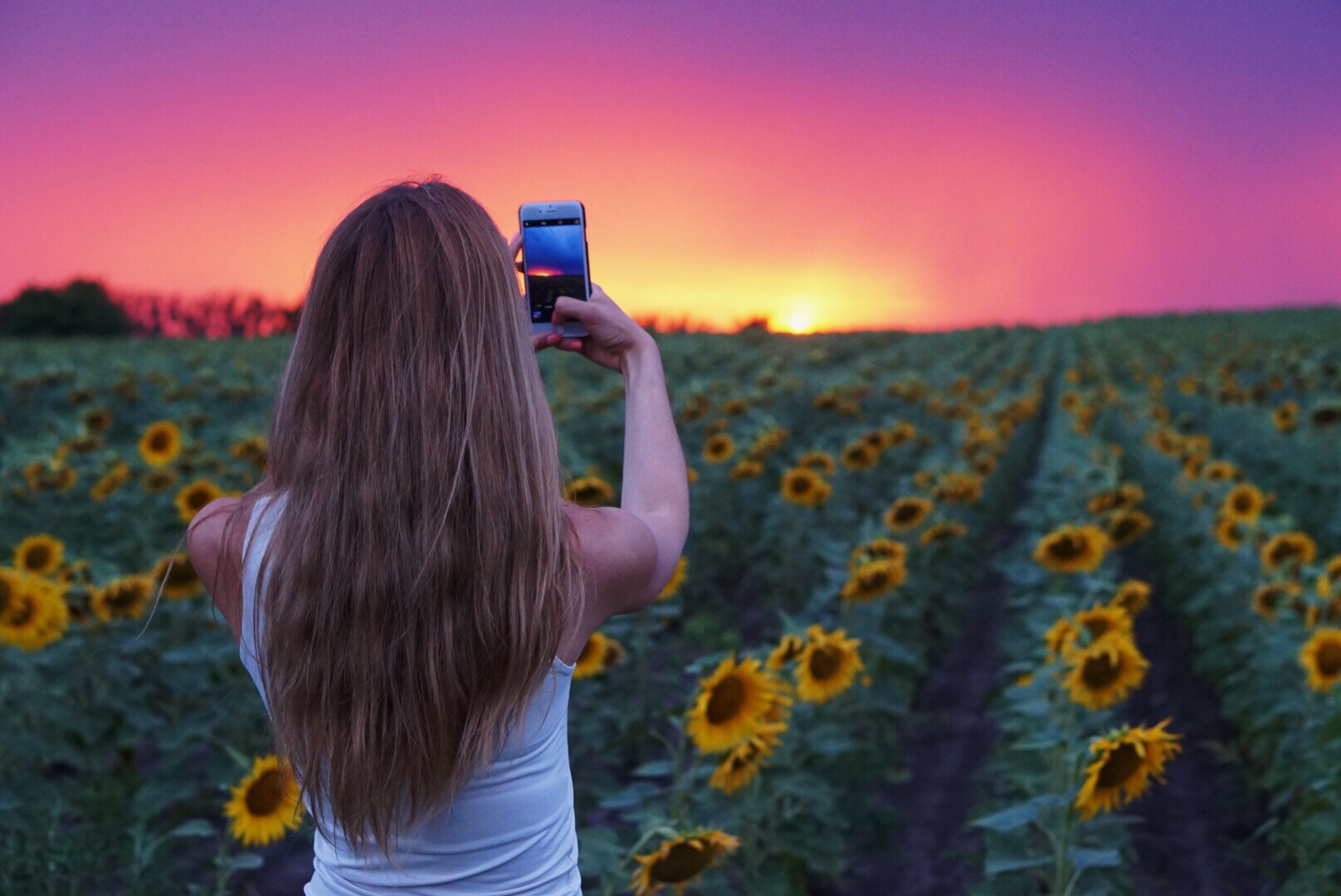
<p><img loading="lazy" decoding="async" class="aligncenter wp-image-3125" src="http://s3.amazonaws.com/artsy-cdn/static/assets/img/wordpress-artifacts/2018/01/05144325/2018-01-05.jpg" alt="" width="646" height="430" srcset="https://s3.amazonaws.com/artsy-cdn/static/assets/img/wordpress-artifacts/2018/01/05144325/2018-01-05.jpg 512w, https://s3.amazonaws.com/artsy-cdn/static/assets/img/wordpress-artifacts/2018/01/05144325/2018-01-05-300x200.jpg 300w" sizes="(max-width: 646px) 100vw, 646px" />How do you capitalize on your favorite accessory?  Some would argue that mobile phone cameras’ capabilities have surpassed those of expensive DSLR cameras, with their in-device applications and easy editing tools. No matter what you use to take your photos, the most important element of a beautiful photo is the person behind the lens. Learn how you can take truly inspiring photos with just the tap of a finger.  To create a truly compelling image using your cell phone, you’ll want to read on. Here are our Best Mobile Photo Tips for 2018!</p>
<p><img loading="lazy" decoding="async" class="size-full wp-image-2850 aligncenter" src="http://s3.amazonaws.com/artsy-cdn/static/assets/img/wordpress-artifacts/2017/08/18155602/AC-Blog_Rule-of-Thirds.jpg" alt="AC Blog_Rule of Thirds" width="900" height="601" srcset="https://s3.amazonaws.com/artsy-cdn/static/assets/img/wordpress-artifacts/2017/08/18155602/AC-Blog_Rule-of-Thirds.jpg 900w, https://s3.amazonaws.com/artsy-cdn/static/assets/img/wordpress-artifacts/2017/08/18155602/AC-Blog_Rule-of-Thirds-300x200.jpg 300w, https://s3.amazonaws.com/artsy-cdn/static/assets/img/wordpress-artifacts/2017/08/18155602/AC-Blog_Rule-of-Thirds-768x513.jpg 768w" sizes="(max-width: 900px) 100vw, 900px" /></p>
<h2><b>1.Popular Techniques.<span style="font-weight: 400;">  </span></b></h2>
<p><b><span style="font-weight: 400;">Let’s start with the easiest tools to get you on the road to a rad shot.  Here are some simple tips you can immediately use:</span></b></p>
<ul>
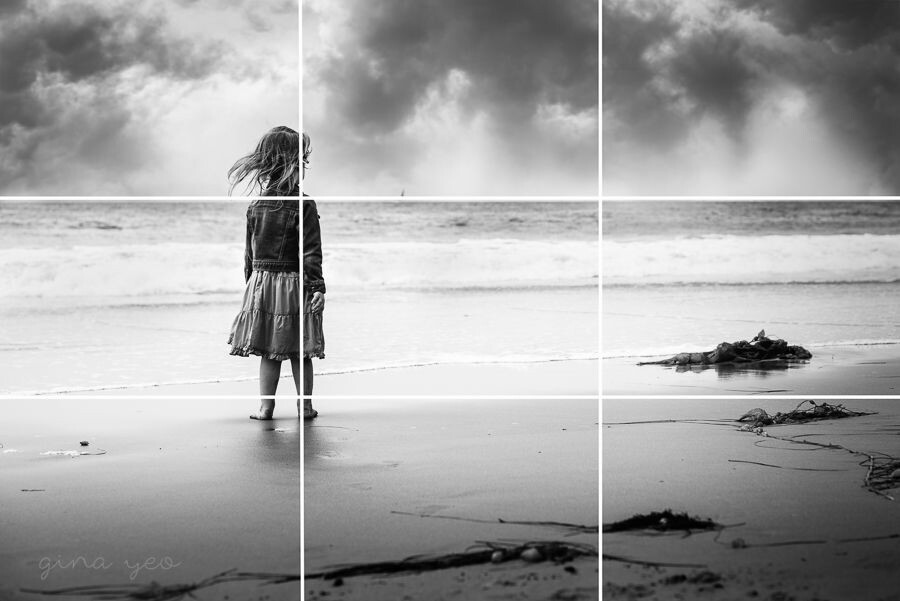
<li style="font-weight: 400;"><span style="font-weight: 400;">Use diagonals, either organically or by tilting your phone</span></li>
<li style="font-weight: 400;"><span style="font-weight: 400;">Follow the “Rule of Thirds”</span></li>
<li style="font-weight: 400;"><span style="font-weight: 400;">Turn on the Grid</span></li>
<li style="font-weight: 400;"><span style="font-weight: 400;">Frame your photo, not the subject, and consider shooting in square to see how it will show on social platforms like Instagram.</span></li>
</ul>
<p><img loading="lazy" decoding="async" class="aligncenter size-full wp-image-3133" src="http://s3.amazonaws.com/artsy-cdn/static/assets/img/wordpress-artifacts/2018/01/05153421/phototrick1.jpg" alt="" width="728" height="524" srcset="https://s3.amazonaws.com/artsy-cdn/static/assets/img/wordpress-artifacts/2018/01/05153421/phototrick1.jpg 728w, https://s3.amazonaws.com/artsy-cdn/static/assets/img/wordpress-artifacts/2018/01/05153421/phototrick1-300x216.jpg 300w" sizes="(max-width: 728px) 100vw, 728px" /></p>
<h2><b>2. Lighting</b><span style="font-weight: 400;">.  </span></h2>
<p><span style="font-weight: 400;">Lighting is a critical piece of any photo.  To properly utilize the phone’s functionality, you should pay attention to the following:</span></p>
<ul>
<li style="font-weight: 400;"><span style="font-weight: 400;">Exposure &#8211; Look for things like good cloud coverage and your angle to the sun.</span></li>
<li style="font-weight: 400;"><span style="font-weight: 400;">Shadows</span></li>
<li style="font-weight: 400;"><span style="font-weight: 400;">Reflections &#8211; They will deepen blues and darks, giving you more of a striking effect in your reflection.  Try and get the entire reflection in your shot, either horizontally or vertically.</span></li>
<li style="font-weight: 400;"><span style="font-weight: 400;">Sky Feature &#8211; Use a flash to enhance a darker foreground image while still getting details of the background by using a fill flash.</span></li>
</ul>
<p><img loading="lazy" decoding="async" class="aligncenter size-full wp-image-3126" src="http://s3.amazonaws.com/artsy-cdn/static/assets/img/wordpress-artifacts/2018/01/05152637/twenty20_469cf7c0-5433-4dd5-a045-e3938a5b3076.jpg" alt="" width="1616" height="1080" srcset="https://s3.amazonaws.com/artsy-cdn/static/assets/img/wordpress-artifacts/2018/01/05152637/twenty20_469cf7c0-5433-4dd5-a045-e3938a5b3076.jpg 1616w, https://s3.amazonaws.com/artsy-cdn/static/assets/img/wordpress-artifacts/2018/01/05152637/twenty20_469cf7c0-5433-4dd5-a045-e3938a5b3076-300x200.jpg 300w, https://s3.amazonaws.com/artsy-cdn/static/assets/img/wordpress-artifacts/2018/01/05152637/twenty20_469cf7c0-5433-4dd5-a045-e3938a5b3076-768x513.jpg 768w" sizes="(max-width: 1616px) 100vw, 1616px" /></p>
<h2><b>3. Lock It In.  </b></h2>
<p><span style="font-weight: 400;">What does this mean?  On your phone, you should have the ability to lock your focus and exposure right on the screen as you take a photo.  Look for the AE/AF LOCK function to set your focus and exposure on the right subject, so regardless of your moving and light shifts, you’ll still get the same great shot!</span></p>
<p><img loading="lazy" decoding="async" class="aligncenter wp-image-3127 size-full" src="http://s3.amazonaws.com/artsy-cdn/static/assets/img/wordpress-artifacts/2018/01/05152637/twenty20_4bafe2dc-82e7-4480-858e-52cd1e486821.jpg" alt="" width="2560" height="1707" srcset="https://s3.amazonaws.com/artsy-cdn/static/assets/img/wordpress-artifacts/2018/01/05152637/twenty20_4bafe2dc-82e7-4480-858e-52cd1e486821.jpg 2560w, https://s3.amazonaws.com/artsy-cdn/static/assets/img/wordpress-artifacts/2018/01/05152637/twenty20_4bafe2dc-82e7-4480-858e-52cd1e486821-300x200.jpg 300w, https://s3.amazonaws.com/artsy-cdn/static/assets/img/wordpress-artifacts/2018/01/05152637/twenty20_4bafe2dc-82e7-4480-858e-52cd1e486821-768x512.jpg 768w" sizes="(max-width: 2560px) 100vw, 2560px" /></p>
<h2><b>4. Get to Great Places! </b><span style="font-weight: 400;"> </span></h2>
<p><span style="font-weight: 400;">This is a no-brainer, but we thought we’d mention it just to be sure.  When taking a photo, specifically for a photo shoot that will be used professionally, you’ll want to make sure you have taken care of the surroundings of your subject carefully.  Consider the following:</span></p>
<ul>
<li style="font-weight: 400;"><b>Color </b><span style="font-weight: 400;">&#8211; What is the effect you are going for?  Do your colors compliment one another or provide a good contrast?</span></li>
<li style="font-weight: 400;"><b>Nature </b><span style="font-weight: 400;">and surroundings &#8211; Having a creative landscape for your shot is key to capturing your audience.  Consider where you are shooting, what is around your subject and the lighting you’ll have to manage.</span></li>
<li style="font-weight: 400;"><b>Props </b><span style="font-weight: 400;">&#8211; These can be fun or flirty, or not necessary at all.  However, props can add a level of detail to your photo that you may desire.</span></li>
<li style="font-weight: 400;"><b>People </b><span style="font-weight: 400;">&#8211; How are you focusing the frame on your subjects?  Keep this in mind when you’re building out a shot</span></li>
</ul>
<figure id="attachment_3132" aria-describedby="caption-attachment-3132" style="width: 900px" class="wp-caption alignnone"><img loading="lazy" decoding="async" class="size-large wp-image-3132" src="http://s3.amazonaws.com/artsy-cdn/static/assets/img/wordpress-artifacts/2018/01/05153142/twenty20_82465941-e37b-435c-9b58-d491259793a5-2400x1600.jpg" alt="" width="900" height="600" srcset="https://s3.amazonaws.com/artsy-cdn/static/assets/img/wordpress-artifacts/2018/01/05153142/twenty20_82465941-e37b-435c-9b58-d491259793a5-2400x1600.jpg 2400w, https://s3.amazonaws.com/artsy-cdn/static/assets/img/wordpress-artifacts/2018/01/05153142/twenty20_82465941-e37b-435c-9b58-d491259793a5-300x200.jpg 300w, https://s3.amazonaws.com/artsy-cdn/static/assets/img/wordpress-artifacts/2018/01/05153142/twenty20_82465941-e37b-435c-9b58-d491259793a5-768x512.jpg 768w" sizes="(max-width: 900px) 100vw, 900px" /><figcaption id="caption-attachment-3132" class="wp-caption-text">Processed with VSCO with c1 preset</figcaption></figure>
<h2><b>5. Shooting Tips</b></h2>
<ul>
<li style="font-weight: 400;"><b>HDR </b><span style="font-weight: 400;">&#8211; HDR is a filter and shooting option that will allow you to get a significant amount more lighting and detail in your shot.  HDR works by taking multiple exposures of one image and flattening together, which works wonderfully for great scenery and nature.  However, be forewarned HDR isn’t always favorable for people.</span></li>
<li style="font-weight: 400;"><b>Selfies </b><span style="font-weight: 400;">&#8211; Want to take a quicky?  Ask Siri to “Take a selfie”, she’ll open RIGHT up!  You may also swipe to the right from your home screen without unlocking and you’ll be able to shoot without unlocking the screen.</span></li>
<li style="font-weight: 400;"><b>Go Stealthy</b><span style="font-weight: 400;"> &#8211; One of our favorite and final tips is using your headphones.  A commonly forgotten feature is the ability to snap a photo with ease using your plugged-in headset.  Simply ‘adjust the volume’ and you’ll be taking burst shots in stealth mode without anyone ever noticing.</span></li>
</ul>
<p><img loading="lazy" decoding="async" class="aligncenter size-full wp-image-3129" src="http://s3.amazonaws.com/artsy-cdn/static/assets/img/wordpress-artifacts/2018/01/05152754/twenty20_4fa4c6f6-9bea-4cd9-8f25-64fc23beb4941.jpg" alt="" width="5184" height="3456" srcset="https://s3.amazonaws.com/artsy-cdn/static/assets/img/wordpress-artifacts/2018/01/05152754/twenty20_4fa4c6f6-9bea-4cd9-8f25-64fc23beb4941.jpg 5184w, https://s3.amazonaws.com/artsy-cdn/static/assets/img/wordpress-artifacts/2018/01/05152754/twenty20_4fa4c6f6-9bea-4cd9-8f25-64fc23beb4941-300x200.jpg 300w, https://s3.amazonaws.com/artsy-cdn/static/assets/img/wordpress-artifacts/2018/01/05152754/twenty20_4fa4c6f6-9bea-4cd9-8f25-64fc23beb4941-768x512.jpg 768w" sizes="(max-width: 5184px) 100vw, 5184px" /></p>
<h2><b>6. Fun Tricks</b></h2>
<ul>
<li><strong>DIY Macro Lens &#8211; </strong>Put a small drop of water on the lens of your phone’s camera,  creating a type of macro lens and bring very small objects into focus. It’s tricky to get right, but the results can be impressive!</li>
<li><strong>Panoramic drive-by &#8211; </strong>Most smartphones come with some sort of stock panorama function that allows you to capture wide scenes by stitching together various images as you move your camera. While these are designed to be used by one person standing in one place, you can also make them work from the window of a moving vehicle, just hold it steady and point it out the window. (Only do if you&#8217;re the passenger!)</li>
<li><strong>Stay OUT of Focus</strong> &#8211; An out of focus background (or foreground) will give your photo the professional quality that you may have been lacking.<span class="Apple-converted-space">  </span>This is especially true when taking photos of a specific subject like a friend or feline, or a crafty cocktail that you spent $20 on.<span class="Apple-converted-space"> </span>Try out the portrait mode and mess around with the editing features in Instagram to blur your background.</li>
</ul>
<p><img loading="lazy" decoding="async" class="alignnone size-large wp-image-3131" src="http://s3.amazonaws.com/artsy-cdn/static/assets/img/wordpress-artifacts/2018/01/05152800/twenty20_4bafe2dc-82e7-4480-858e-52cd1e4868211-2400x1600.jpg" alt="" width="900" height="600" srcset="https://s3.amazonaws.com/artsy-cdn/static/assets/img/wordpress-artifacts/2018/01/05152800/twenty20_4bafe2dc-82e7-4480-858e-52cd1e4868211-2400x1600.jpg 2400w, https://s3.amazonaws.com/artsy-cdn/static/assets/img/wordpress-artifacts/2018/01/05152800/twenty20_4bafe2dc-82e7-4480-858e-52cd1e4868211-300x200.jpg 300w, https://s3.amazonaws.com/artsy-cdn/static/assets/img/wordpress-artifacts/2018/01/05152800/twenty20_4bafe2dc-82e7-4480-858e-52cd1e4868211-768x512.jpg 768w" sizes="(max-width: 900px) 100vw, 900px" /></p>
<p><span style="font-weight: 400;">Need more help getting your cell phone photo game on point?  Join the Artsy Couture Pro Community for FREE and gain exclusive insights and product news from the industries best.</span></p>
<hr />
<p>Enjoy this article? Check out some of our other favorites:</p>
<ul>
<li><a href="http://www.artsycouture.com/blog/5-tips-building-business-facebook" target="_blank" rel="noopener">5 Tips to Build Your Business on Facebook</a></li>
<li><a href="http://www.artsycouture.com/blog/instagram-tips-for-photographers" target="_blank" rel="noopener">How I Grew My Instagram Account to Over 300,000 Followers</a></li>
<li><a href="http://www.artsycouture.com/blog/optimize-website-photos" target="_blank" rel="noopener">Three Tips to Optimize Your Website Photos for SEO</a></li>
</ul>
<p>&nbsp;</p>
<p><img loading="lazy" decoding="async" class="aligncenter size-full wp-image-2808" src="http://s3.amazonaws.com/artsy-cdn/static/assets/img/wordpress-artifacts/2017/08/03160055/900_AC_Blog_POST_Signup.png" alt="" width="900" height="220" srcset="https://s3.amazonaws.com/artsy-cdn/static/assets/img/wordpress-artifacts/2017/08/03160055/900_AC_Blog_POST_Signup.png 900w, https://s3.amazonaws.com/artsy-cdn/static/assets/img/wordpress-artifacts/2017/08/03160055/900_AC_Blog_POST_Signup-300x73.png 300w, https://s3.amazonaws.com/artsy-cdn/static/assets/img/wordpress-artifacts/2017/08/03160055/900_AC_Blog_POST_Signup-768x188.png 768w" sizes="(max-width: 900px) 100vw, 900px" /></p>
{"id":3118,"date":"2018-01-05T15:34:48","date_gmt":"2018-01-05T20:34:48","guid":{"rendered":"http:\/\/www.artsycouture.com\/blog\/?p=3118"},"modified":"2018-03-30T10:08:09","modified_gmt":"2018-03-30T14:08:09","slug":"best-mobile-photo-tips-for-2018","status":"publish","type":"post","link":"https:\/\/www.artsycouture.com\/blog\/best-mobile-photo-tips-for-2018\/","title":{"rendered":"Best Mobile Photo Tips for 2018"},"content":{"rendered":"<p><img loading=\"lazy\" decoding=\"async\" class=\"aligncenter wp-image-3125\" src=\"http:\/\/s3.amazonaws.com\/artsy-cdn\/static\/assets\/img\/wordpress-artifacts\/2018\/01\/05144325\/2018-01-05.jpg\" alt=\"\" width=\"646\" height=\"430\" srcset=\"https:\/\/s3.amazonaws.com\/artsy-cdn\/static\/assets\/img\/wordpress-artifacts\/2018\/01\/05144325\/2018-01-05.jpg 512w, https:\/\/s3.amazonaws.com\/artsy-cdn\/static\/assets\/img\/wordpress-artifacts\/2018\/01\/05144325\/2018-01-05-300x200.jpg 300w\" sizes=\"(max-width: 646px) 100vw, 646px\" \/>How do you capitalize on your favorite accessory?\u00a0 Some would argue that mobile phone cameras\u2019 capabilities have surpassed those of expensive DSLR cameras, with their in-device applications and easy editing tools. No matter what you use to take your photos, the most important element of a beautiful photo is the person behind the lens. Learn how you can take truly inspiring photos with just the tap of a finger.\u00a0\u00a0To create a truly compelling image using your cell phone, you\u2019ll want to read on.\u00a0Here are our\u00a0Best Mobile Photo Tips for 2018!<\/p>\n<p><img loading=\"lazy\" decoding=\"async\" class=\"size-full wp-image-2850 aligncenter\" src=\"http:\/\/s3.amazonaws.com\/artsy-cdn\/static\/assets\/img\/wordpress-artifacts\/2017\/08\/18155602\/AC-Blog_Rule-of-Thirds.jpg\" alt=\"AC Blog_Rule of Thirds\" width=\"900\" height=\"601\" srcset=\"https:\/\/s3.amazonaws.com\/artsy-cdn\/static\/assets\/img\/wordpress-artifacts\/2017\/08\/18155602\/AC-Blog_Rule-of-Thirds.jpg 900w, https:\/\/s3.amazonaws.com\/artsy-cdn\/static\/assets\/img\/wordpress-artifacts\/2017\/08\/18155602\/AC-Blog_Rule-of-Thirds-300x200.jpg 300w, https:\/\/s3.amazonaws.com\/artsy-cdn\/static\/assets\/img\/wordpress-artifacts\/2017\/08\/18155602\/AC-Blog_Rule-of-Thirds-768x513.jpg 768w\" sizes=\"(max-width: 900px) 100vw, 900px\" \/><\/p>\n<h2><b>1.Popular Techniques.<span style=\"font-weight: 400;\"> \u00a0<\/span><\/b><\/h2>\n<p><b><span style=\"font-weight: 400;\">Let\u2019s start with the easiest tools to get you on the road to a rad shot. \u00a0Here are some simple tips you can immediately use:<\/span><\/b><\/p>\n<ul>\n<li style=\"font-weight: 400;\"><span style=\"font-weight: 400;\">Use diagonals, either organically or by tilting your phone<\/span><\/li>\n<li style=\"font-weight: 400;\"><span style=\"font-weight: 400;\">Follow the \u201cRule of Thirds\u201d<\/span><\/li>\n<li style=\"font-weight: 400;\"><span style=\"font-weight: 400;\">Turn on the Grid<\/span><\/li>\n<li style=\"font-weight: 400;\"><span style=\"font-weight: 400;\">Frame your photo, not the subject, and consider shooting in square to see how it will show on social platforms like Instagram.<\/span><\/li>\n<\/ul>\n<p><img loading=\"lazy\" decoding=\"async\" class=\"aligncenter size-full wp-image-3133\" src=\"http:\/\/s3.amazonaws.com\/artsy-cdn\/static\/assets\/img\/wordpress-artifacts\/2018\/01\/05153421\/phototrick1.jpg\" alt=\"\" width=\"728\" height=\"524\" srcset=\"https:\/\/s3.amazonaws.com\/artsy-cdn\/static\/assets\/img\/wordpress-artifacts\/2018\/01\/05153421\/phototrick1.jpg 728w, https:\/\/s3.amazonaws.com\/artsy-cdn\/static\/assets\/img\/wordpress-artifacts\/2018\/01\/05153421\/phototrick1-300x216.jpg 300w\" sizes=\"(max-width: 728px) 100vw, 728px\" \/><\/p>\n<h2><b>2. Lighting<\/b><span style=\"font-weight: 400;\">. \u00a0<\/span><\/h2>\n<p><span style=\"font-weight: 400;\">Lighting is a critical piece of any photo. \u00a0To properly utilize the phone\u2019s functionality, you should pay attention to the following:<\/span><\/p>\n<ul>\n<li style=\"font-weight: 400;\"><span style=\"font-weight: 400;\">Exposure &#8211; Look for things like good cloud coverage and your angle to the sun.<\/span><\/li>\n<li style=\"font-weight: 400;\"><span style=\"font-weight: 400;\">Shadows<\/span><\/li>\n<li style=\"font-weight: 400;\"><span style=\"font-weight: 400;\">Reflections &#8211; They will deepen blues and darks, giving you more of a striking effect in your reflection. \u00a0Try and get the entire reflection in your shot, either horizontally or vertically.<\/span><\/li>\n<li style=\"font-weight: 400;\"><span style=\"font-weight: 400;\">Sky Feature &#8211; Use a flash to enhance a darker foreground image while still getting details of the background by using a fill flash.<\/span><\/li>\n<\/ul>\n<p><img loading=\"lazy\" decoding=\"async\" class=\"aligncenter size-full wp-image-3126\" src=\"http:\/\/s3.amazonaws.com\/artsy-cdn\/static\/assets\/img\/wordpress-artifacts\/2018\/01\/05152637\/twenty20_469cf7c0-5433-4dd5-a045-e3938a5b3076.jpg\" alt=\"\" width=\"1616\" height=\"1080\" srcset=\"https:\/\/s3.amazonaws.com\/artsy-cdn\/static\/assets\/img\/wordpress-artifacts\/2018\/01\/05152637\/twenty20_469cf7c0-5433-4dd5-a045-e3938a5b3076.jpg 1616w, https:\/\/s3.amazonaws.com\/artsy-cdn\/static\/assets\/img\/wordpress-artifacts\/2018\/01\/05152637\/twenty20_469cf7c0-5433-4dd5-a045-e3938a5b3076-300x200.jpg 300w, https:\/\/s3.amazonaws.com\/artsy-cdn\/static\/assets\/img\/wordpress-artifacts\/2018\/01\/05152637\/twenty20_469cf7c0-5433-4dd5-a045-e3938a5b3076-768x513.jpg 768w\" sizes=\"(max-width: 1616px) 100vw, 1616px\" \/><\/p>\n<h2><b>3. Lock It In. \u00a0<\/b><\/h2>\n<p><span style=\"font-weight: 400;\">What does this mean? \u00a0On your phone, you should have the ability to lock your focus and exposure right on the screen as you take a photo. \u00a0Look for the AE\/AF LOCK function to set your focus and exposure on the right subject, so regardless of your moving and light shifts, you\u2019ll still get the same great shot!<\/span><\/p>\n<p><img loading=\"lazy\" decoding=\"async\" class=\"aligncenter wp-image-3127 size-full\" src=\"http:\/\/s3.amazonaws.com\/artsy-cdn\/static\/assets\/img\/wordpress-artifacts\/2018\/01\/05152637\/twenty20_4bafe2dc-82e7-4480-858e-52cd1e486821.jpg\" alt=\"\" width=\"2560\" height=\"1707\" srcset=\"https:\/\/s3.amazonaws.com\/artsy-cdn\/static\/assets\/img\/wordpress-artifacts\/2018\/01\/05152637\/twenty20_4bafe2dc-82e7-4480-858e-52cd1e486821.jpg 2560w, https:\/\/s3.amazonaws.com\/artsy-cdn\/static\/assets\/img\/wordpress-artifacts\/2018\/01\/05152637\/twenty20_4bafe2dc-82e7-4480-858e-52cd1e486821-300x200.jpg 300w, https:\/\/s3.amazonaws.com\/artsy-cdn\/static\/assets\/img\/wordpress-artifacts\/2018\/01\/05152637\/twenty20_4bafe2dc-82e7-4480-858e-52cd1e486821-768x512.jpg 768w\" sizes=\"(max-width: 2560px) 100vw, 2560px\" \/><\/p>\n<h2><b>4. Get to Great Places! <\/b><span style=\"font-weight: 400;\">\u00a0<\/span><\/h2>\n<p><span style=\"font-weight: 400;\">This is a no-brainer, but we thought we\u2019d mention it just to be sure. \u00a0When taking a photo, specifically for a photo shoot that will be used professionally, you\u2019ll want to make sure you have taken care of the surroundings of your subject carefully. \u00a0Consider the following:<\/span><\/p>\n<ul>\n<li style=\"font-weight: 400;\"><b>Color <\/b><span style=\"font-weight: 400;\">&#8211; What is the effect you are going for? \u00a0Do your colors compliment one another or provide a good contrast?<\/span><\/li>\n<li style=\"font-weight: 400;\"><b>Nature <\/b><span style=\"font-weight: 400;\">and surroundings &#8211; Having a creative landscape for your shot is key to capturing your audience. \u00a0Consider where you are shooting, what is around your subject and the lighting you\u2019ll have to manage.<\/span><\/li>\n<li style=\"font-weight: 400;\"><b>Props <\/b><span style=\"font-weight: 400;\">&#8211; These can be fun or flirty, or not necessary at all. \u00a0However, props can add a level of detail to your photo that you may desire.<\/span><\/li>\n<li style=\"font-weight: 400;\"><b>People <\/b><span style=\"font-weight: 400;\">&#8211; How are you focusing the frame on your subjects? \u00a0Keep this in mind when you\u2019re building out a shot<\/span><\/li>\n<\/ul>\n<figure id=\"attachment_3132\" aria-describedby=\"caption-attachment-3132\" style=\"width: 900px\" class=\"wp-caption alignnone\"><img loading=\"lazy\" decoding=\"async\" class=\"size-large wp-image-3132\" src=\"http:\/\/s3.amazonaws.com\/artsy-cdn\/static\/assets\/img\/wordpress-artifacts\/2018\/01\/05153142\/twenty20_82465941-e37b-435c-9b58-d491259793a5-2400x1600.jpg\" alt=\"\" width=\"900\" height=\"600\" srcset=\"https:\/\/s3.amazonaws.com\/artsy-cdn\/static\/assets\/img\/wordpress-artifacts\/2018\/01\/05153142\/twenty20_82465941-e37b-435c-9b58-d491259793a5-2400x1600.jpg 2400w, https:\/\/s3.amazonaws.com\/artsy-cdn\/static\/assets\/img\/wordpress-artifacts\/2018\/01\/05153142\/twenty20_82465941-e37b-435c-9b58-d491259793a5-300x200.jpg 300w, https:\/\/s3.amazonaws.com\/artsy-cdn\/static\/assets\/img\/wordpress-artifacts\/2018\/01\/05153142\/twenty20_82465941-e37b-435c-9b58-d491259793a5-768x512.jpg 768w\" sizes=\"(max-width: 900px) 100vw, 900px\" \/><figcaption id=\"caption-attachment-3132\" class=\"wp-caption-text\">Processed with VSCO with c1 preset<\/figcaption><\/figure>\n<h2><b>5. Shooting Tips<\/b><\/h2>\n<ul>\n<li style=\"font-weight: 400;\"><b>HDR <\/b><span style=\"font-weight: 400;\">&#8211; HDR is a filter and shooting option that will allow you to get a significant amount more lighting and detail in your shot. \u00a0HDR works by taking multiple exposures of one image and flattening together, which works wonderfully for great scenery and nature. \u00a0However, be forewarned HDR isn\u2019t always favorable for people.<\/span><\/li>\n<li style=\"font-weight: 400;\"><b>Selfies <\/b><span style=\"font-weight: 400;\">&#8211; Want to take a quicky? \u00a0Ask Siri to \u201cTake a selfie\u201d, she\u2019ll open RIGHT up! \u00a0You may also swipe to the right from your home screen without unlocking and you\u2019ll be able to shoot without unlocking the screen.<\/span><\/li>\n<li style=\"font-weight: 400;\"><b>Go Stealthy<\/b><span style=\"font-weight: 400;\"> &#8211; One of our favorite and final tips is using your headphones. \u00a0A commonly forgotten feature is the ability to snap a photo with ease using your plugged-in headset. \u00a0Simply \u2018adjust the volume\u2019 and you\u2019ll be taking burst shots in stealth mode without anyone ever noticing.<\/span><\/li>\n<\/ul>\n<p><img loading=\"lazy\" decoding=\"async\" class=\"aligncenter size-full wp-image-3129\" src=\"http:\/\/s3.amazonaws.com\/artsy-cdn\/static\/assets\/img\/wordpress-artifacts\/2018\/01\/05152754\/twenty20_4fa4c6f6-9bea-4cd9-8f25-64fc23beb4941.jpg\" alt=\"\" width=\"5184\" height=\"3456\" srcset=\"https:\/\/s3.amazonaws.com\/artsy-cdn\/static\/assets\/img\/wordpress-artifacts\/2018\/01\/05152754\/twenty20_4fa4c6f6-9bea-4cd9-8f25-64fc23beb4941.jpg 5184w, https:\/\/s3.amazonaws.com\/artsy-cdn\/static\/assets\/img\/wordpress-artifacts\/2018\/01\/05152754\/twenty20_4fa4c6f6-9bea-4cd9-8f25-64fc23beb4941-300x200.jpg 300w, https:\/\/s3.amazonaws.com\/artsy-cdn\/static\/assets\/img\/wordpress-artifacts\/2018\/01\/05152754\/twenty20_4fa4c6f6-9bea-4cd9-8f25-64fc23beb4941-768x512.jpg 768w\" sizes=\"(max-width: 5184px) 100vw, 5184px\" \/><\/p>\n<h2><b>6. Fun Tricks<\/b><\/h2>\n<ul>\n<li><strong>DIY Macro Lens &#8211;\u00a0<\/strong>Put a small drop of water on the lens of your\u00a0phone\u2019s\u00a0camera, \u00a0creating a type of macro lens and bring very small objects into focus. It\u2019s tricky to get right, but the results can be impressive!<\/li>\n<li><strong>Panoramic drive-by &#8211;\u00a0<\/strong>Most smartphones\u00a0come with some sort of stock panorama function that allows you to capture wide scenes by stitching together various images as you move your camera. While these are designed to be used by one person standing in one place, you can also make them work from the window of a moving vehicle, just hold it steady and point it out the window. (Only do if you&#8217;re the passenger!)<\/li>\n<li><strong>Stay OUT of Focus<\/strong> &#8211;\u00a0An out of focus background (or foreground) will give your photo the professional quality that you may have been lacking.<span class=\"Apple-converted-space\">\u00a0\u00a0<\/span>This is especially true when taking photos of a specific subject like a friend or feline, or a crafty cocktail that you spent $20 on.<span class=\"Apple-converted-space\">\u00a0<\/span>Try out the portrait mode and mess around with the editing features in Instagram to blur your background.<\/li>\n<\/ul>\n<p><img loading=\"lazy\" decoding=\"async\" class=\"alignnone size-large wp-image-3131\" src=\"http:\/\/s3.amazonaws.com\/artsy-cdn\/static\/assets\/img\/wordpress-artifacts\/2018\/01\/05152800\/twenty20_4bafe2dc-82e7-4480-858e-52cd1e4868211-2400x1600.jpg\" alt=\"\" width=\"900\" height=\"600\" srcset=\"https:\/\/s3.amazonaws.com\/artsy-cdn\/static\/assets\/img\/wordpress-artifacts\/2018\/01\/05152800\/twenty20_4bafe2dc-82e7-4480-858e-52cd1e4868211-2400x1600.jpg 2400w, https:\/\/s3.amazonaws.com\/artsy-cdn\/static\/assets\/img\/wordpress-artifacts\/2018\/01\/05152800\/twenty20_4bafe2dc-82e7-4480-858e-52cd1e4868211-300x200.jpg 300w, https:\/\/s3.amazonaws.com\/artsy-cdn\/static\/assets\/img\/wordpress-artifacts\/2018\/01\/05152800\/twenty20_4bafe2dc-82e7-4480-858e-52cd1e4868211-768x512.jpg 768w\" sizes=\"(max-width: 900px) 100vw, 900px\" \/><\/p>\n<p><span style=\"font-weight: 400;\">Need more help getting your cell phone photo game on point? \u00a0Join the Artsy Couture Pro Community for FREE and gain exclusive insights and product news from the industries best.<\/span><\/p>\n<hr \/>\n<p>Enjoy this article? Check out some of our other favorites:<\/p>\n<ul>\n<li><a href=\"http:\/\/www.artsycouture.com\/blog\/5-tips-building-business-facebook\" target=\"_blank\" rel=\"noopener\">5 Tips to Build Your Business on Facebook<\/a><\/li>\n<li><a href=\"http:\/\/www.artsycouture.com\/blog\/instagram-tips-for-photographers\" target=\"_blank\" rel=\"noopener\">How I Grew My Instagram Account to Over 300,000 Followers<\/a><\/li>\n<li><a href=\"http:\/\/www.artsycouture.com\/blog\/optimize-website-photos\" target=\"_blank\" rel=\"noopener\">Three Tips to Optimize Your Website Photos for SEO<\/a><\/li>\n<\/ul>\n<p>&nbsp;<\/p>\n<p><img loading=\"lazy\" decoding=\"async\" class=\"aligncenter size-full wp-image-2808\" src=\"http:\/\/s3.amazonaws.com\/artsy-cdn\/static\/assets\/img\/wordpress-artifacts\/2017\/08\/03160055\/900_AC_Blog_POST_Signup.png\" alt=\"\" width=\"900\" height=\"220\" srcset=\"https:\/\/s3.amazonaws.com\/artsy-cdn\/static\/assets\/img\/wordpress-artifacts\/2017\/08\/03160055\/900_AC_Blog_POST_Signup.png 900w, https:\/\/s3.amazonaws.com\/artsy-cdn\/static\/assets\/img\/wordpress-artifacts\/2017\/08\/03160055\/900_AC_Blog_POST_Signup-300x73.png 300w, https:\/\/s3.amazonaws.com\/artsy-cdn\/static\/assets\/img\/wordpress-artifacts\/2017\/08\/03160055\/900_AC_Blog_POST_Signup-768x188.png 768w\" sizes=\"(max-width: 900px) 100vw, 900px\" \/><\/p>\n","protected":false},"excerpt":{"rendered":null,"protected":false},"author":3,"featured_media":3130,"comment_status":"closed","ping_status":"closed","sticky":false,"template":"","format":"standard","meta":{"footnotes":""},"categories":[211,43,42],"tags":[223,222,221,88,89,175,224,56,35,73,47,94,168,131,139,225],"_links":{"self":[{"href":"https:\/\/www.artsycouture.com\/blog\/wp-json\/wp\/v2\/posts\/3118"}],"collection":[{"href":"https:\/\/www.artsycouture.com\/blog\/wp-json\/wp\/v2\/posts"}],"about":[{"href":"https:\/\/www.artsycouture.com\/blog\/wp-json\/wp\/v2\/types\/post"}],"author":[{"embeddable":true,"href":"https:\/\/www.artsycouture.com\/blog\/wp-json\/wp\/v2\/users\/3"}],"replies":[{"embeddable":true,"href":"https:\/\/www.artsycouture.com\/blog\/wp-json\/wp\/v2\/comments?post=3118"}],"version-history":[{"count":11,"href":"https:\/\/www.artsycouture.com\/blog\/wp-json\/wp\/v2\/posts\/3118\/revisions"}],"predecessor-version":[{"id":3401,"href":"https:\/\/www.artsycouture.com\/blog\/wp-json\/wp\/v2\/posts\/3118\/revisions\/3401"}],"wp:featuredmedia":[{"embeddable":true,"href":"https:\/\/www.artsycouture.com\/blog\/wp-json\/wp\/v2\/media\/3130"}],"wp:attachment":[{"href":"https:\/\/www.artsycouture.com\/blog\/wp-json\/wp\/v2\/media?parent=3118"}],"wp:term":[{"taxonomy":"category","embeddable":true,"href":"https:\/\/www.artsycouture.com\/blog\/wp-json\/wp\/v2\/categories?post=3118"},{"taxonomy":"post_tag","embeddable":true,"href":"https:\/\/www.artsycouture.com\/blog\/wp-json\/wp\/v2\/tags?post=3118"}],"curies":[{"name":"wp","href":"https:\/\/api.w.org\/{rel}","templated":true}]}}